
This post has been republished via RSS; it originally appeared at: New blog articles in Microsoft Tech Community.
By nature, and by default each pod can talk to all other pods within a Kubernetes cluster. This behaviour sometimes is not desirable as some application owners may not agree to share connectivity to other applications. Or would like to restrict access in or out of the backend applications running on certain pods. Network Policy comes to your rescue in those cases.
Network policies or network security policies are kind of firewall rules for Kubernetes cluster. These are implemented with the help of Network Plugin or Container Network Interface (CNI) and control traffic flow at the IP address or port level (OSI layer 3 or 4). These policies are applied at the Namespace level and can restrict ingress and egress to and from a pod or a group of pods based on how they are configured. Please read more about Network Policies in official documentation of Kubernetes.
Please read this article that describes how to set up network policy on your AKS cluster. It also gives detailed information on how to configure and test network policies on pods. Assuming you read through this article, let’s take a simple but practical example and try to explore how network policies can help us.

The diagram above describes a very common requirement. We have 2 subnets within our virtual network. The AKS cluster within AKS subnet has 2 namespaces – Backend and Frontend. Backend namespace has one pod DB and Frontend namespace has 2 pods API and App. Subnet VM has only one VM called Test VM. The ingress and egress criteria are as followed:
1. DB Pod can only receive ingress request from API Pod and nothing else.
2. Egress from DB Pod is not allowed.
3. App Pod and API Pod can receive ingress request from anywhere within the VNET.
4. Egress from App Pod to API Pod and API Pod to Backend Namespace is only permitted.
Step1
Open Azure CLI and provision a new resource group, virtual network, and subnets:
Step2
Provision a VM within VM Subnet and ensure you can do SSH to it:
Step 3
Now create your AKS cluster. Remember to add the flag “network-policy”.
Step 4
Connect to your AKS cluster and create the namespaces and pods. We are keeping all pods with simple image of nginx. This is for demo purpose only.
Step 5
Get the IP addresses of your pods

Now try accessing dbpod using curl from apppod or the VM we created earlier. You will see we can access it all right and nginx web server default page shows up.

You can check this with other pods as well. You will find all pods are accessible from the others as well as from the VM.
Step 6
We will now set up network policies to restrict ingress and egress based on the criteria given above. First create a policy for dbpod:
This network policy defines there is no egress allowed from dbpod and ingress is allowed from only apipod under frontend namespace and that too at port 80 only. Remember the ingress -from statement here is inclusive of both namespace and the pod selection. If you use the following instead
This will mean any pod under namespace frontend and only apipod within current namespace (backend). So, one dash (-) can change the whole context.
Step 7
Now, it’s time to check the access. First try from apipod
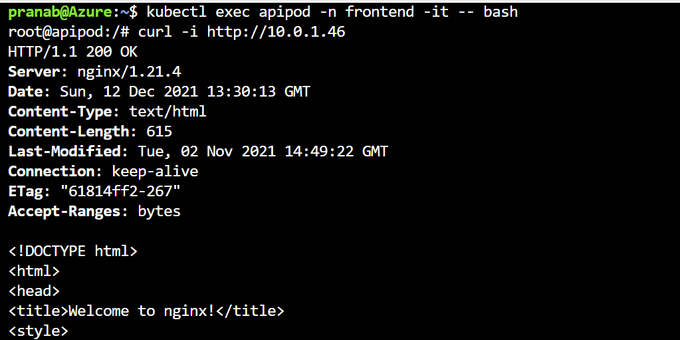
Then, from apppod

Next, from testvm
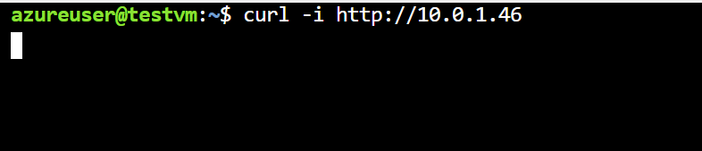
So, as you can see, we covered both criteria 1 and 2 and successfully tested those.
Step 8
We will create 2 more policies for apipod and apppod but we are not going to test those exclusively.
With this we covered criteria 3 and 4 as well. We saw how Network Policies can control traffic flow (ingress and egress) within your Kubernetes cluster and in some cases outside the cluster as well. One question persists, what happens when we use multiple instances of similar pods such as in ReplicaSet or Deployment. The answer is it remains the same. You restrict ingress or egress by either pod labels, namespace labels or IP ranges. And in case of a ReplicaSet, the pod lables remains same for all the pods within the ReplicaSet. You can use DNS name to check/test instead of IP address of the pod if you have exposed the pod/deployment through a Service. Additionally, we use Ingress Controller and User Defined Routes (UDR) to control traffic respectively towards and from the cluster in relation to the network outside.
That’s pretty much it. We will talk about security of ingress and egress in the context of network in the next part of this series.