Issue:
Trying to login to Azure SQL Managed Instance (MI) from SQL Server Management Studio (SSMS) using AAD-Integrated keeps getting the below error. However, the user is able to connect to MI using AAD-Password, AAD-MFA and SQL Authentication without any issue:

Below is the detailed error from SSMS:
===================================
Cannot connect to mySQLMI.xxxxxx.database.windows.net.
===================================
One or more errors occurred. (mscorlib)
——————————
Program Location:
at System.Threading.Tasks.Task.ThrowIfExceptional(Boolean includeTaskCanceledExceptions)
at System.Threading.Tasks.Task.Wait(Int32 millisecondsTimeout, CancellationToken cancellationToken)
at System.Data.SqlClient.SqlInternalConnectionTds.GetFedAuthToken(SqlFedAuthInfo fedAuthInfo)
at System.Data.SqlClient.SqlInternalConnectionTds.OnFedAuthInfo(SqlFedAuthInfo fedAuthInfo)
at System.Data.SqlClient.TdsParser.TryRun(RunBehavior runBehavior, SqlCommand cmdHandler, SqlDataReader dataStream, BulkCopySimpleResultSet bulkCopyHandler, TdsParserStateObject stateObj, Boolean& dataReady)
at System.Data.SqlClient.TdsParser.Run(RunBehavior runBehavior, SqlCommand cmdHandler, SqlDataReader dataStream, BulkCopySimpleResultSet bulkCopyHandler, TdsParserStateObject stateObj)
at System.Data.SqlClient.SqlInternalConnectionTds.CompleteLogin(Boolean enlistOK)
at System.Data.SqlClient.SqlInternalConnectionTds.AttemptOneLogin(ServerInfo serverInfo, String newPassword, SecureString newSecurePassword, Boolean ignoreSniOpenTimeout, TimeoutTimer timeout, Boolean withFailover, Boolean isFirstTransparentAttempt, Boolean disableTnir)
at System.Data.SqlClient.SqlInternalConnectionTds.LoginNoFailover(ServerInfo serverInfo, String newPassword, SecureString newSecurePassword, Boolean redirectedUserInstance, SqlConnectionString connectionOptions, SqlCredential credential, TimeoutTimer timeout)
at System.Data.SqlClient.SqlInternalConnectionTds.OpenLoginEnlist(TimeoutTimer timeout, SqlConnectionString connectionOptions, SqlCredential credential, String newPassword, SecureString newSecurePassword, Boolean redirectedUserInstance)
at System.Data.SqlClient.SqlInternalConnectionTds..ctor(DbConnectionPoolIdentity identity, SqlConnectionString connectionOptions, SqlCredential credential, Object providerInfo, String newPassword, SecureString newSecurePassword, Boolean redirectedUserInstance, SqlConnectionString userConnectionOptions, SessionData reconnectSessionData, DbConnectionPool pool, String accessToken, Boolean applyTransientFaultHandling, SqlAuthenticationProviderManager sqlAuthProviderManager)
at System.Data.SqlClient.SqlConnectionFactory.CreateConnection(DbConnectionOptions options, DbConnectionPoolKey poolKey, Object poolGroupProviderInfo, DbConnectionPool pool, DbConnection owningConnection, DbConnectionOptions userOptions)
at System.Data.ProviderBase.DbConnectionFactory.CreateNonPooledConnection(DbConnection owningConnection, DbConnectionPoolGroup poolGroup, DbConnectionOptions userOptions)
at System.Data.ProviderBase.DbConnectionFactory.TryGetConnection(DbConnection owningConnection, TaskCompletionSource`1 retry, DbConnectionOptions userOptions, DbConnectionInternal oldConnection, DbConnectionInternal& connection)
at System.Data.ProviderBase.DbConnectionInternal.TryOpenConnectionInternal(DbConnection outerConnection, DbConnectionFactory connectionFactory, TaskCompletionSource`1 retry, DbConnectionOptions userOptions)
at System.Data.ProviderBase.DbConnectionClosed.TryOpenConnection(DbConnection outerConnection, DbConnectionFactory connectionFactory, TaskCompletionSource`1 retry, DbConnectionOptions userOptions)
at System.Data.SqlClient.SqlConnection.TryOpenInner(TaskCompletionSource`1 retry)
at System.Data.SqlClient.SqlConnection.TryOpen(TaskCompletionSource`1 retry)
at System.Data.SqlClient.SqlConnection.Open()
at Microsoft.SqlServer.Management.SqlStudio.Explorer.ObjectExplorerService.ValidateConnection(UIConnectionInfo ci, IServerType server)
at Microsoft.SqlServer.Management.UI.ConnectionDlg.Connector.ConnectionThreadUser()
===================================
One or more errors occurred. (mscorlib)
——————————
Program Location:
at System.Threading.Tasks.Task.ThrowIfExceptional(Boolean includeTaskCanceledExceptions)
at System.Threading.Tasks.Task`1.GetResultCore(Boolean waitCompletionNotification)
at System.Threading.Tasks.Task`1.get_Result()
at System.Data.SqlClient.SqlInternalConnectionTds.<>c__DisplayClass134_1.<GetFedAuthToken>b__0()
at System.Threading.Tasks.Task`1.InnerInvoke()
at System.Threading.Tasks.Task.Execute()
===================================
<?xml version=”1.0″ encoding=”utf-8″?><S:Envelope xmlns:wsa=”http://www.w3.org/2005/08/addressing” xmlns:wsse=”http://docs.oasis-open.org/wss/2004/01/oasis-200401-wss-wssecurity-secext-1.0.xsd” xmlns:wsu=”http://docs.oasis-open.org/wss/2004/01/oasis-200401-wss-wssecurity-utility-1.0.xsd” xmlns:wsp=”http://schemas.xmlsoap.org/ws/2004/09/policy” xmlns:wst=”http://schemas.xmlsoap.org/ws/2005/02/trust” xmlns:S=”http://www.w3.org/2003/05/soap-envelope”> S:mustUnderstand=”1″ wsu:Id=”Action”>http://schemas.xmlsoap.org/ws/2005/02/trust/RSTR/Issue S:mustUnderstand=”1″ wsu:Id=”To”>http://schemas.xmlsoap.org/ws/2004/08/addressing/role/anonymous S:mustUnderstand=”1″><wsu:Timestamp wsu:Id=”TS” xmlns:wsu=”http://docs.oasis-open.org/wss/2004/01/oasis-200401-wss-wssecurity-utility-1.0.xsd”>2021-06-03T14:54:06.2749193Z2021-06-03T14:59:06.2749193Z xmlns:S=”http://www.w3.org/2003/05/soap-envelope”> xmlns:wsu=”http://docs.oasis-open.org/wss/2004/01/oasis-200401-wss-wssecurity-utility-1.0.xsd” xmlns:wsp=”http://schemas.xmlsoap.org/ws/2004/09/policy” xmlns:wst=”http://schemas.xmlsoap.org/ws/2005/02/trust”> xmlns:wsa=”http://www.w3.org/2005/08/addressing”> xmlns:psf=”http://schemas.microsoft.com/Passport/SoapServices/SOAPFault”>0x8004882c0x80045b00 (System.Data)
Reason:
This error may occurs when the computer account “AZUREADSSOACC” has an issue such as being removed or disabled for some reason.
How this account created:
When you enable Azure Active Directory Seamless Single Sign-On feature from Portal; this account will be created in your on-premises Active Directory (AD) in each AD forest that you synchronize to Azure AD (using Azure AD Connect), along with a number of Kerberos service principal names (SPNs) that are created to be used during the Azure AD sign-in process.
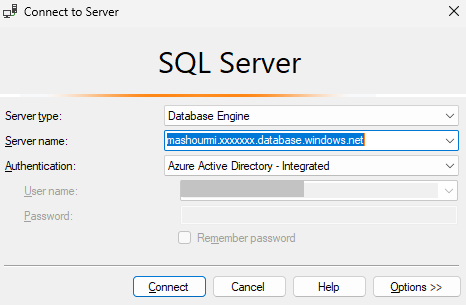
Azure Active Directory Seamless Single Sign-On feature will allow the users to login to their Azure SQL without the need to type in their passwords, and usually, even type in their usernames as shown below:
Mitigation:
- If the user removed the computer account “AZUREADSSOACC“, we recommend to re-enable the Azure Active Directory Seamless single sign-on feature if possible.
- If the user disabled the computer account “AZUREADSSOACC“, they can follow the below steps to enable it back:
-
To open Active Directory Users and Computers, click Start, click Control Panel, double-click Administrative Tools, and then double-click Active Directory Users and Computers.
-
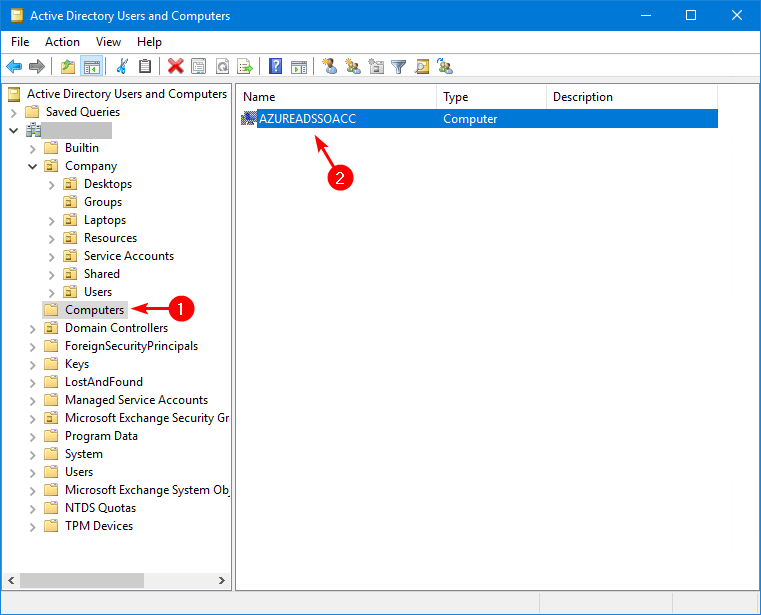
In the console tree, click Computers.
Where? Active Directory Users and Computers\domain node\Computers
Or, click the folder that contains the computer account that you want to enable as shown below:
-
In the details pane, right-click the desired computer account, and then click Enable Account.
For more information about this issue, please refer to the following documents:
