
This post has been republished via RSS; it originally appeared at: Microsoft Security Blog.
Microsoft Incident Response – Detection and Response Team (DART) researchers observed an emerging, financially motivated threat actor that Microsoft tracks as Storm-2755 conducting payroll pirate attacks targeting Canadian users. In this campaign, Storm-2755 compromised user accounts to gain unauthorized access to employee profiles and divert salary payments to attacker-controlled accounts, resulting in direct financial loss for affected individuals and organizations.
While similar payroll pirate attacks have been observed in other malicious campaigns, Storm-2755’s campaign is distinct in both its delivery and targeting. Rather than focusing on a specific industry or organization, the actor relied exclusively on geographic targeting of Canadian users and used malvertising and search engine optimization (SEO) poisoning on industry agnostic search terms to identify victims. The campaign also leveraged adversary‑in‑the‑middle (AiTM) techniques to hijack authenticated sessions, allowing the threat actor to bypass multifactor authentication (MFA) and blend into legitimate user activity.
Microsoft has been actively engaged with affected organizations and taken multiple disruption efforts to help prevent further compromise, including tenant takedown. Microsoft continues to engage affected customers, providing visibility by sharing observed tactics, techniques, and procedures (TTPs) while supporting mitigation efforts.
In this blog, we present our analysis of Storm-2755’s recent campaign and the TTPs employed across each stage of the attack chain. To support proactive mitigations against this campaign and similar activity, we also provide comprehensive guidance for investigation and remediation, including recommendations such as implementing phishing-resistant MFA to help block these attacks and protect user accounts.
Storm-2755’s attack chain
Analysis of this activity reveals a financially motivated campaign built around session hijacking and abuse of legitimate enterprise workflows. Storm-2755 combined initial credential and token theft with session persistence and targeted discovery to identify payroll and human resources (HR) processes within affected Canadian organizations. By operating through authenticated user sessions and blending into normal business activity, the threat actor was able to minimize detection while pursuing direct financial gain.
The sections below examine each stage of the attack chain—from initial access through impact—detailing the techniques observed.
Initial access
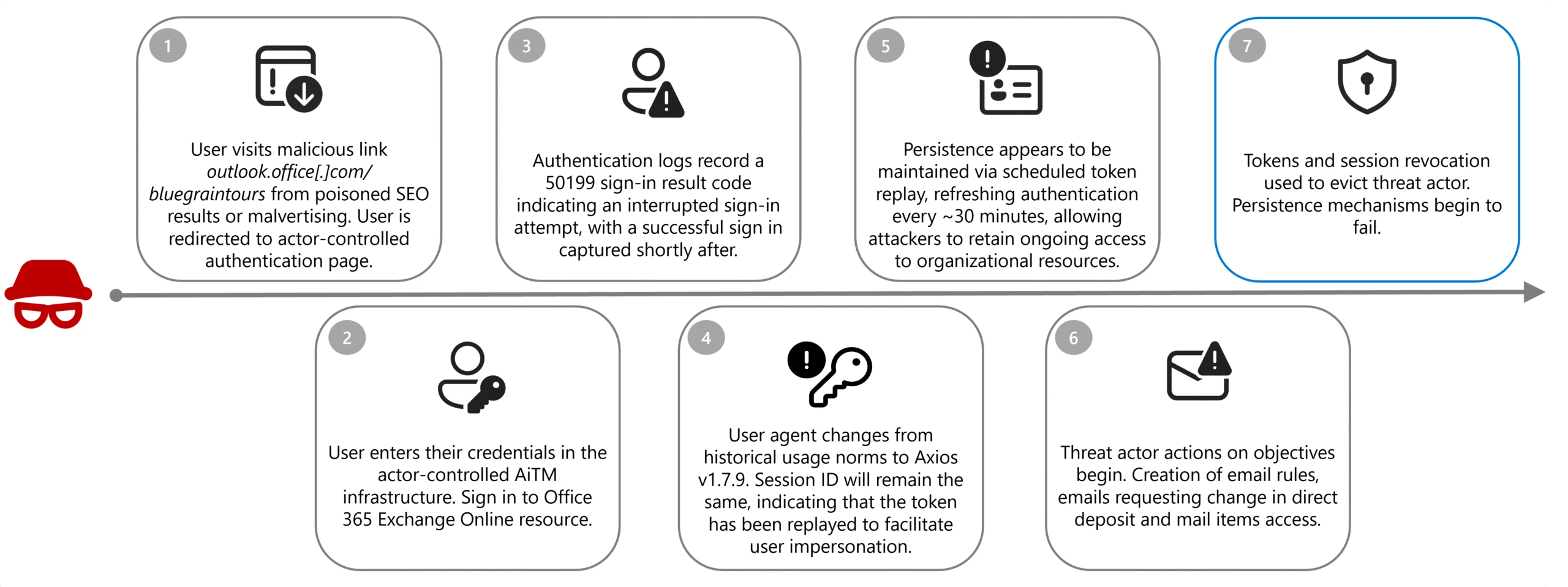
In the observed campaign, Storm-2755 likely gained initial access through SEO poisoning or malvertising that positioned the actor-controlled domain, bluegraintours[.]com, at the top of search results for generic queries like “Office 365” or common misspellings like “Office 265”. Based on data received by DART, unsuspecting users who clicked these links were directed to a malicious Microsoft 365 sign-in page designed to mimic the legitimate experience, resulting in token and credential theft when users entered their credentials.
Once a user entered their credentials into the malicious page, sign-in logs reveal that the victim recorded a 50199 sign-in interrupt error immediately before Storm-2755 successfully compromised the account. When the session shifts from legitimate user activity to threat actor control, the user-agent for the session changes to Axios; typically, version 1.7.9, however the session ID will remain consistent, indicating that the token has been replayed.
This activity aligns with an AiTM attack—an evolution of traditional credential phishing techniques—in which threat actors insert malicious infrastructure between the victim and a legitimate authentication service. Rather than harvesting only usernames and passwords, AiTM frameworks proxy the entire authentication flow in real time, enabling the capture session cookies and OAuth access tokens issued upon successful authentication. Due to these tokens representing a fully authenticated session, threat actors can reuse them to gain access to Microsoft services without being prompted for credentials or MFA, effectively bypassing legacy MFA protections not designed to be phishing-resistant; phishing-resistant methods such as FIDO2/WebAuthN are designed to mitigate this risk.
While Axios is not a malicious tool, this attack path seems to take advantage of known vulnerabilities of the open-source software, namely CVE-2025-27152, which can lead to server-side request forgeries.
Persistence
Storm-2755 leveraged version 1.7.9 of the Axios HTTP client to relay authentication tokens to the customer infrastructure which effectively bypassed non-phishing resistant MFA and preserved access without requiring repeated sign ins. This replay flow allowed Storm-2755 to maintain these active sessions and proxy legitimate user actions, effectively executing an AiTM attack.
Microsoft consistently observed non-interactive sign ins to the OfficeHome application associated with the Axios user-agent occurring approximately every 30 minutes until remediation actions revoked active session tokens, which allowed Storm-2755 to maintain these active sessions and proxy legitimate user actions without detection.
After around 30 days, we observed that the stolen tokens would then become inactive when Storm-2755 did not continue maintaining persistence within the environment. The refresh token became unusable due to expiration, rotation, or policy enforcement, preventing the issuance of new access tokens after the session token had expired. The compromised sessions primarily featured non-interactive sign ins to OfficeHome and recorded sign ins to Microsoft Outlook, My Sign-Ins, and My Profile. For a more limited set of identities, password and MFA changes were observed to maintain more durable persistence within the environment after the token had expired.
Discovery
Once user accounts have been successfully comprised, discovery actions begin to identify internal processes and mailboxes associated with payroll and HR. Specific intranet searches during compromised sessions focused on keywords such as “payroll”, “HR”, “human”, “resources”, ”support”, “info”, “finance”, ”account”, and “admin” across several customer environments.
Email subject lines were also consistent across all compromised users; “Question about direct deposit”, with the goal of socially engineering HR or finance staff members into performing manual changes to payroll instructions on behalf of Storm-2755, removing the need for further hands-on-keyboard activity.
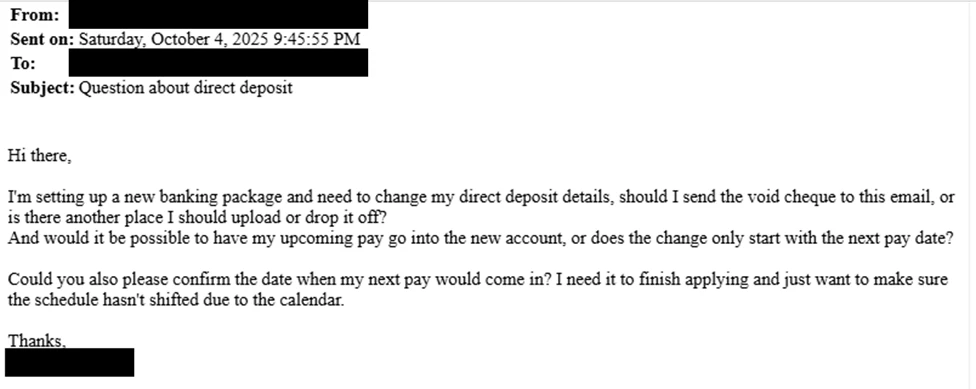
While similar recent campaigns have observed email content being tailored to the institution and incorporating elements to reference senior leadership contacts, Storm-2755’s attack seems to be focused on compromising employees in Canada more broadly.
Where Storm-2755 was unable to successfully achieve changes to payroll information through user impersonation and social engineering of HR personnel, we observed a pivot to direct interaction and manual manipulation of HR software-as-a-service (SaaS) programs such as Workday. While the example below illustrates the attack flow as observed in Workday environments, it’s important to note that similar techniques could be leveraged against any payroll provider or SaaS platform.
Defense evasion
Following discovery activities, but prior to email impersonation, Storm-2755 created email inbox rules to move emails containing the keywords “direct deposit” or “bank” to the compromised user’s conversation history and prevent further rule processing. This rule ensured that the victim would not see the email correspondence from their HR team regarding the malicious request for bank account changes as this correspondence was immediately moved to a hidden folder.
This technique was highly effective in disguising the account compromise to the end user, allowing the threat actor to discreetly continue actions to redirect payments to an actor-controlled bank account undisturbed.
To further avoid potential detection by the account owner, Storm-2755 renewed the stolen session around 5:00 AM in the user’s time zone, operating outside normal business hours to reduce the chance of a legitimate reauthentication that would invalidate their access.
Impact
The compromise led to a direct financial loss for one user. In this case, Storm-2755 was able to gain access to the user’s account and created inbox rules to prevent emails that contained “direct deposit” or “bank”, effectively suppressing alerts from HR. Using the stolen session, the threat actor would email HR to request changes to direct deposit details, HR would then send back the instructions on how to change it. This led Storm-2755 to manually sign in to Workday as the victim to update banking information, resulting in a payroll check being redirected to an attacker-controlled bank account.
Defending against Storm-2755 and AiTM campaigns
Organizations should mitigate AiTM attacks by revoking compromised tokens and sessions immediately, removing malicious inbox rules, and resetting credentials and MFA methods for affected accounts.
To harden defenses, enforce device compliance enforcement through Conditional Access policies, implement phishing-resistant MFA, and block legacy authentication protocols. Organizations storing data in a security information and event management (SIEM) solution enable Defenders to quickly establish a clearer baseline of regular and irregular activity to distinguish compromised sessions from legitimate activity.
Enable Microsoft Defender to automatically disrupt attacks, revoke tokens in real time, monitor for anomalous user-agents like Axios, and audit OAuth applications to prevent persistence. Finally, run phishing simulation campaigns to improve user awareness and reduce susceptibility to credential theft.
To proactively protect against this attack pattern and similar patterns of compromise Microsoft recommends:
- Implement phishing resistant MFA where possible: Traditional MFA methods such as SMS codes, email-based one-time passwords (OTPs), and push notifications are becoming less effective against today’s attackers. Sophisticated phishing campaigns have demonstrated that second factors can be intercepted or spoofed.
- Use Conditional Access Policies to configure adaptive session lifetime policies: Session lifetime and persistence can be managed in several different ways based on organizational needs. These policies are designed to restrict extended session lifetime by prompting the user for reauthentication. This reauthentication might involve only one first factor, such as password, FIDO2 security keys, or passwordless Microsoft Authenticator, or it might require MFA.
- Leverage continuous access evaluation (CAE): For supporting applications to ensure access tokens are re-evaluated in near real time when risk conditions change. CAE reduces the effectiveness of stolen access and fresh tokens by allowing access to be promptly revoked following user risk changes, credential resets, or policy enforcement events limiting attacker persistence.
- Consider Global Secure Access (GSA) as a complementary network control path: Microsoft’s Global Secure Access (Entra Internet Access + Entra Private Access) extends Zero Trust enforcement to the network layer, providing an identity-aware secure network edge that strengthens CAE signal fidelity, enables Compliant Network Conditional Access conditions, and ensures consistent policy enforcement across identity, device, and network—forming a complete third managed path alongside identity and device controls.
- Create alerting of suspicious inbox-rule creation: This alerting is essential to quickly identify and triage evidence of business email compromise (BEC) and phishing campaigns. This playbook helps defenders investigate any incident related to suspicious inbox manipulation rules configured by threat actors and take recommended actions to remediate the attack and protect networks.
- Secure organizational resources through Microsoft Intune compliance policies: When integrated with Microsoft Entra Conditional Access policies, Intune offers an added layer of protection based on a devices current compliance status to help ensure that only devices that are compliant are permitted to access corporate resources.
Microsoft Defender detection and hunting guidance
Microsoft Defender customers can refer to the list of applicable detections below. Microsoft Defender XDR coordinates detection, prevention, investigation, and response across endpoints, identities, email, apps to provide integrated protection against attacks like the threat discussed in this blog.
| Tactic | Observed activity | Microsoft Defender coverage |
| Credential access | An OAuth device code authentication was detected in an unusual context based on user behavior and sign-in patterns. | Microsoft Defender XDR – Anomalous OAuth device code authentication activity |
| Credential access | A possible token theft has been detected. Threat actor tricked a user into granting consent or sharing an authorization code through social engineering or AiTM techniques. | Microsoft Defender XDR – Possible adversary-in-the-middle (AiTM) attack detected (ConsentFix) |
| Initial access | Token replay often result in sign ins from geographically distant IP addresses. The presence of sign ins from non-standard locations should be investigated further to validate suspected token replay. | Microsoft Entra ID Protection – Atypical Travel – Impossible Travel – Unfamiliar sign-in properties (lower confidence) |
| Initial access | An authentication attempt was detected that aligns with patterns commonly associated with credential abuse or identity attacks. | Microsoft Defender XDR – Potential Credential Abuse in Entra ID Authentication |
| Initial access | A successful sign in using an uncommon user-agent and a potentially malicious IP address was detected in Microsoft Entra. | Microsoft Defender XDR – Suspicious Sign-In from Unusual User Agent and IP Address |
| Persistence | A user was suspiciously registered or joined into a new device to Entra, originating from an IP address identified by Microsoft Threat Intelligence. | Microsoft Defender XDR – Suspicious Entra device join or registration |
Microsoft Security Copilot
Microsoft Security Copilot is embedded in Microsoft Defender and provides security teams with AI-powered capabilities to summarize incidents, analyze files and scripts, summarize identities, use guided responses, and generate device summaries, hunting queries, and incident reports.
Customers can also deploy AI agents, including the following Microsoft Security Copilot agents, to perform security tasks efficiently:
- Threat Intelligence Briefing agent
- Phishing Triage agent
- Threat Hunting agent
- Dynamic Threat Detection agent
Security Copilot is also available as a standalone experience where customers can perform specific security-related tasks, such as incident investigation, user analysis, and vulnerability impact assessment. In addition, Security Copilot offers developer scenarios that allow customers to build, test, publish, and integrate AI agents and plugins to meet unique security needs.
Threat intelligence reports
Microsoft Defender XDR customers can use the following threat analytics reports in the Defender portal (requires license for at least one Defender XDR product) to get the most up-to-date information about the threat actor, malicious activity, and techniques discussed in this blog. These reports provide the intelligence, protection information, and recommended actions to prevent, mitigate, or respond to associated threats found in customer environments.
Microsoft Defender XDR threat analytics
- Activity Profile: Targeted “payroll pirate” attacks affecting US universities
- Actor Profile: Storm-2657
Microsoft Security Copilot customers can also use the Microsoft Security Copilot integration in Microsoft Defender Threat Intelligence, either in the Security Copilot standalone portal or in the embedded experience in the Microsoft Defender portal to get more information about this threat actor.
Hunting queries
Microsoft Defender XDR
Microsoft Defender XDR customers can run the following queries to find related activity in their networks:
Review inbox rules created to hide or delete incoming emails from Workday
Results of the following query may indicate an attacker is trying to delete evidence of Workday activity.
CloudAppEvents
| where Timestamp >= ago(1d)
| where Application == "Microsoft Exchange Online" and ActionType in ("New-InboxRule", "Set-InboxRule")
| extend Parameters = RawEventData.Parameters // extract inbox rule parameters
| where Parameters has "From" and Parameters has "@myworkday.com" // filter for inbox rule with From field and @MyWorkday.com in the parameters
| where Parameters has "DeleteMessage" or Parameters has ("MoveToFolder") // email deletion or move to folder (hiding)
| mv-apply Parameters on (where Parameters.Name == "From"
| extend RuleFrom = tostring(Parameters.Value))
| mv-apply Parameters on (where Parameters.Name == "Name"
| extend RuleName = tostring(Parameters.Value))
Review updates to payment election or bank account information in Workday
The following query surfaces changes to payment accounts in Workday.
CloudAppEvents
| where Timestamp >= ago(1d)
| where Application == "Workday"
| where ActionType == "Change My Account" or ActionType == "Manage Payment Elections"
| extend Descriptor = tostring(RawEventData.target.descriptor)
Microsoft Sentinel
Microsoft Sentinel customers can use the TI Mapping analytics (a series of analytics all prefixed with ‘TI map’) to automatically match the malicious domain indicators mentioned in this blog post with data in their workspace. If the TI Map analytics are not currently deployed, customers can install the Threat Intelligence solution from the Microsoft Sentinel Content Hub to have the analytics rule deployed in their Sentinel workspace.
Malicious inbox rule
The query includes filters specific to inbox rule creation, operations for messages with DeleteMessage, and suspicious keywords.
let Keywords = dynamic(["direct deposit", “hr”, “bank”]);
OfficeActivity
| where OfficeWorkload =~ "Exchange"
| where Operation =~ "New-InboxRule" and (ResultStatus =~ "True" or ResultStatus =~ "Succeeded")
| where Parameters has "Deleted Items" or Parameters has "Junk Email"  or Parameters has "DeleteMessage"
| extend Events=todynamic(Parameters)
| parse Events  with * "SubjectContainsWords" SubjectContainsWords '}'*
| parse Events  with * "BodyContainsWords" BodyContainsWords '}'*
| parse Events  with * "SubjectOrBodyContainsWords" SubjectOrBodyContainsWords '}'*
| where SubjectContainsWords has_any (Keywords)
 or BodyContainsWords has_any (Keywords)
 or SubjectOrBodyContainsWords has_any (Keywords)
| extend ClientIPAddress = case( ClientIP has ".", tostring(split(ClientIP,":")[0]), ClientIP has "[", tostring(trim_start(@'[[]',tostring(split(ClientIP,"]")[0]))), ClientIP )
| extend Keyword = iff(isnotempty(SubjectContainsWords), SubjectContainsWords, (iff(isnotempty(BodyContainsWords),BodyContainsWords,SubjectOrBodyContainsWords )))
| extend RuleDetail = case(OfficeObjectId contains '/' , tostring(split(OfficeObjectId, '/')[-1]) , tostring(split(OfficeObjectId, '\\')[-1]))
| summarize count(), StartTimeUtc = min(TimeGenerated), EndTimeUtc = max(TimeGenerated) by  Operation, UserId, ClientIPAddress, ResultStatus, Keyword, OriginatingServer, OfficeObjectId, RuleDetail
| extend AccountName = tostring(split(UserId, "@")[0]), AccountUPNSuffix = tostring(split(UserId, "@")[1])
| extend OriginatingServerName = tostring(split(OriginatingServer, " ")[0])
Detect network IP and domain indicators of compromise using ASIM
The following query checks IP addresses and domain IOCs across data sources supported by ASIM network session parser.
//IP list and domain list- _Im_NetworkSession
let lookback = 30d;
let ioc_domains = dynamic(["http://bluegraintours.com"]);
_Im_NetworkSession(starttime=todatetime(ago(lookback)), endtime=now())
| where DstDomain has_any (ioc_domains)
| summarize imNWS_mintime=min(TimeGenerated), imNWS_maxtime=max(TimeGenerated),
  EventCount=count() by SrcIpAddr, DstIpAddr, DstDomain, Dvc, EventProduct, EventVendor
Detect domain and URL indicators of compromise using ASIM
The following query checks domain and URL IOCs across data sources supported by ASIM web session parser.
// file hash list - imFileEvent
// Domain list - _Im_WebSession
let ioc_domains = dynamic(["http://bluegraintours.com"]);
_Im_WebSession (url_has_any = ioc_domains)
Indicators of compromise
In observed compromises associated with hxxp://bluegraintours[.]com, sign-in logs consistently showed a distinctive authentication pattern. This pattern included multiple failed sign‑in attempts with various causes followed by a failure citing Microsoft Entra error code 50199, immediately preceding a successful authentication. Upon successful sign in, the user-agent shifted to Axios, while the session ID remained unchanged—an indication that an authenticated session token had been replayed rather than a new session established. This combination of error sequencing, user‑agent transition, and session continuity is characteristic of AiTM activity and should be evaluated together when assessing potential compromise tied to this domain
| Indicator | Type | Description |
| hxxp://bluegraintours[.]com | URL | Malicious website created to steal user tokens |
| axios/1.7.9 | User-agent string | User agent string utilized during AiTM attack |
Acknowledgments
- https://pushsecurity.com/blog/phishing-with-active-directory-federation-services/ – Push Security offers a deep technical analysis of an Active Directory Federation Services (ADFS)‑enabled phishing attack, demonstrating how the bluegraintours[.]com ADFS deployment was exploited to intercept authentication tokens.
Learn more
For the latest security research from the Microsoft Threat Intelligence community, check out the Microsoft Threat Intelligence Blog.
To get notified about new publications and to join discussions on social media, follow us on LinkedIn, X (formerly Twitter), and Bluesky.
To hear stories and insights from the Microsoft Threat Intelligence community about the ever-evolving threat landscape, listen to the Microsoft Threat Intelligence podcast.
The post Investigating Storm-2755: “Payroll pirate” attacks targeting Canadian employees appeared first on Microsoft Security Blog.