
This post has been republished via RSS; it originally appeared at: Microsoft Mobile Engineering - Medium.
Did you ever encounter a use case, where you put heavy initialisations/calls at the time of launching a screen but the initialisation is not critical for showing the screen to the user but we can not wait for on demand lazy init also. We end up adding that code to the android’s lifecycle callbacks. In this article we will try to find out a solution to this and discuss the pros and cons to the approach.

Want to improve screen launch times of your android app lazily? Learn how to achieve that!
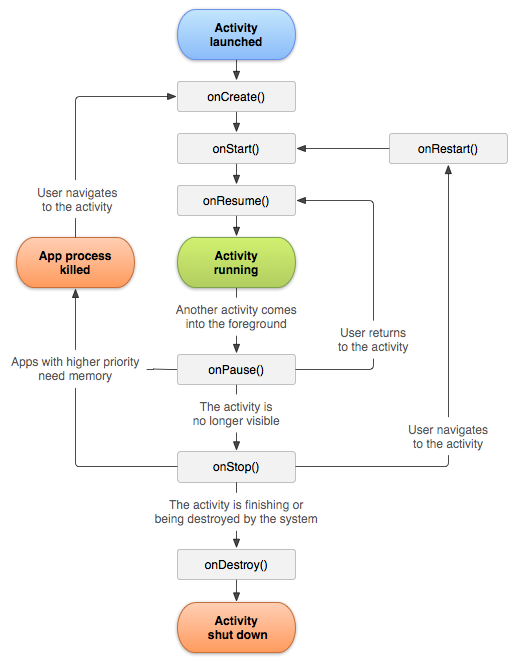
Screen is considered as rendered only when the activity is in resumed state and all upward lifecycle callbacks have returned.
If we put any thing expensive in OnCreate, onStart, onResume that could potentially eat CPU cycles before the screen is rendered and may be we do not want that in bigger apps, that have lots of things to initialise and eating CPU cycles could be a cause of high impact performance issues.
Some of the example of expensive(required) but not critical(for screen rendering) kind of calls could be,
- Initialising some libraries/managers.
- Making telemetry calls.
- Prefetches from db or n/w
- Calls to download files.
Confused?
Let me give a concrete example. We had a use case in MS-Teams app, where we had to download RN bundles for apps that are installed by the user, the number of apps could vary between 0 .. N.
It could take a good amount of time(in the 1st launch), if we try to download and setup the app on-demand. Though the approach is ideal but did not suit our latency needs. Putting that in the application class, or lifecycle callbacks could create negative impact on the launch time of the application.
We had to find out a middle way where we can push this out from launch path but not till on demand.
LazyLifecycleCallbacks was born with this need in mind…..

The idea was simple, what if we build a setup that could fire a piece of code after the rendering of the app has finished( We could leverage onPreDrawListener for this and wait for couple of draws on the screen ).
But there were issues, we were dealing with legacy code, where a lot of code was already there in the activity/fragment lifecycle callbacks. So if we defer the onResume code, it should fire every time the app resumes but after the rendering has finished. Code in onCreate should fire only once in the activity lifetime. We had to maintain the contracts of each lazy lifecycle callback.
We created 3 callbacks
- onLazyCreate — fires after screen rendering has finished once per activity instance.
- onLazyStart— fires after screen rendering has finished, multiple times when activity starts.
- onLazyResume — fires after screen rendering has finished, multiple times when activity resumes.
We have a watched view in the contract. As I explained, we will depend on draws on the screen. We need a view to install listeners on that. You can chose a view that is critical for a screen or decor view can be used in case you do not have any.
So, the idea was to make the activities/fragments that implement this interface be able to onboard this. And some of the screens were very heavy in terms of layout hierarchy. Profiler showed that couple of draws were not enough to fully render a meaningful screen, when we had screenful of data. So we needed to create a mechanism where we can set the number of draws(N) we should wait before we fire the callbacks. And a backup plan, if N draws do not happen(kind of an override deadline). That will fire the code anyhow if the N draws did not happen.
This required serious state management and was prone to error as you have to handle multiple states as demonstrated below. Code can potentially fire from 2 paths but should fire only once ie. If the N draws have finished before SLA, the code should fire due to condition becoming true and SLA expiration should be a no-op. Or if, SLA expired before the condition becoming true then the code should not execute if the condition becomes true.
- Condition becoming true ( draws == N) // Path A
- SLA breached // Path B

To handle all the state management out of the box, and we can build a scaffold that works for any condition(that we provide), we came up with a concept Barrier that does all these things, handles concurrency for us and is properly unit tested.
Barrier — It is a construct that could prevent execution of a piece of code( defined in runOnBreak) till condition becomes true or the SLA is breached. Timer for SLA starts when we call startSLA() on the barrier.
To install a barrier, in the path where the condition needs to get evaluated we use barrier.strike(). In our setup, we will use strike() call in the pre-draw listener, every time the strike is executed the condition is evaluated, if it is true then the code is fired.
Barrier implementation —
Using barrier we can build there complex constructs easily with one fluent API.
Barrier b = Barrier.with(new Barrier.Condition() {
    @Override
    public boolean evaluate() {
        return false;
    }
}).withSLA(2000, true)
        .runOnBreak(() -> {
            // Some code that runs on condition satisfied
        }).startSLA();
So, now we have all the pieces ready. We can build the LazyLifeycycleManager that will take care of firing lazy lifecycle callbacks.
To use this, we just have to call activate() in the onResume.
class Activity extends SomeBaseActivity implements LazyLifecycleCallbacks {@Override public void onResume() {
mLazyLifecycleManager.activate(this);
}@Override public void onLazyResume() {
// Some deferrable job that needs to run on every resume
}@Override public void onLazyStart() {
// Some deferrable job that needs to run on every start
}@Override public void onLazyCreate() {
// Some deferrable job that needs to run on every create
}}
Once all the setup is done, this mechanism could be used for all the Activities and with a little tweak in the code of LifecycleManager( the condition where we check for activity instance), could also be leveraged for fragments.
Results were amazing, where we removed lots of work from the app launch path and gained some app launch points.
Apart from play store console we have internal scorecard mechanism that measures the improvements in terms of %. The P95 for warm improved by 24% and for cold it was was ~12%.
Caveats —
1. Do not defer everything at the same time, or else all the lazy callbacks for different activities could be executing at the same time and compete.
2. This is not the replacement of optimisation, if something is taking time it should be analysed and solved. Deferring would just defer the problem. This is meant of things that are time consuming by nature but are required and we cannot make it on demand.
Post Read — Once you take the code from the Gist, it will look for a class Once. This is to assure that a code is executed only once in a thread safe manner.
Signing off.
Improve android app/screen launch times using LazyLifecycle callbacks. was originally published in Microsoft Mobile Engineering on Medium, where people are continuing the conversation by highlighting and responding to this story.