
This post has been republished via RSS; it originally appeared at: New blog articles in Microsoft Community Hub.
The Azure Cosmos DB managed connector can connect to Azure Cosmos DB using Logic App managed identity on both Logic App Consumption and Standard. The built-in connector does not support using managed identity.
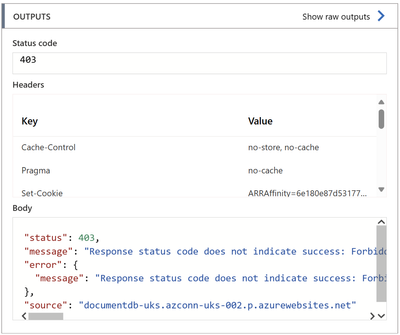
In order for the connection to work, you need to assign the required permissions to your Logic App managed identity on Azure Cosmos DB account. Otherwise, you will get the following error message while executing the workflow action:
To assign the required permissions, you need to add the required role assignment for your Logic App managed identity to Access Control (IAM) of Azure Cosmos DB account. The Cosmos DB built-in roles are not available on the portal, to achieve this you will need to use Azure PowerShell or Azure CLI to execute the following command after replacing the values in bold with your account details:
az cosmosdb sql role assignment create --account-name comos-db-no-sql --resource-group comsos-db-rg --scope "/" --principal-id logic-app-managed-identity-object-id --role-definition-id /subscriptions/sub-id/resourceGroups/comsos-db-rg/providers/Microsoft.DocumentDB/databaseAccounts/comos-db-no-sql/sqlRoleDefinitions/00000000-0000-0000-0000-000000000001
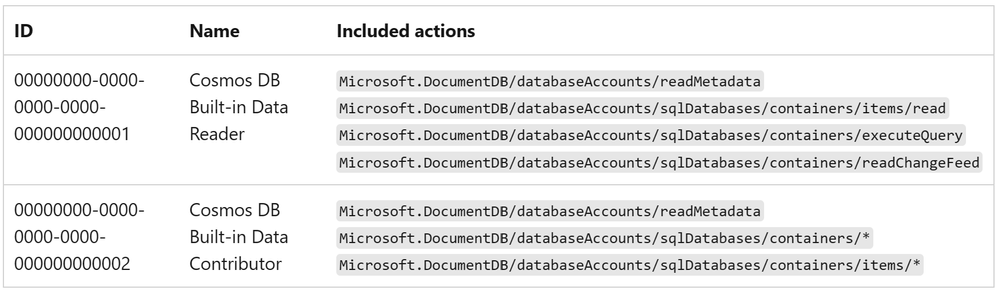
There are two Cosmos DB built-in roles available:
For more details about Cosmos DB built-in roles, check the following reference: Configure role-based access control with Microsoft Entra ID - Azure Cosmos Db | Microsoft Learn