This post has been republished via RSS; it originally appeared at: Windows Developer Blog.
Welcome to the latest release of Dev Home, where we’ve been working to deliver your top asks. Dev Home is available by default and is open source on GitHub. Let’s dive into what‘s new!Machine configuration improvements
The machine configuration tool is intended to help you get your developer machine set up in a snap. We’ve made some improvements to it with additional WinGet DSC integration. You can now generate a configuration file after going through the setup flow and Dev Home will also detect a configuration file in a repo after cloning. We’ve also added a new summary and details view when running configuration files.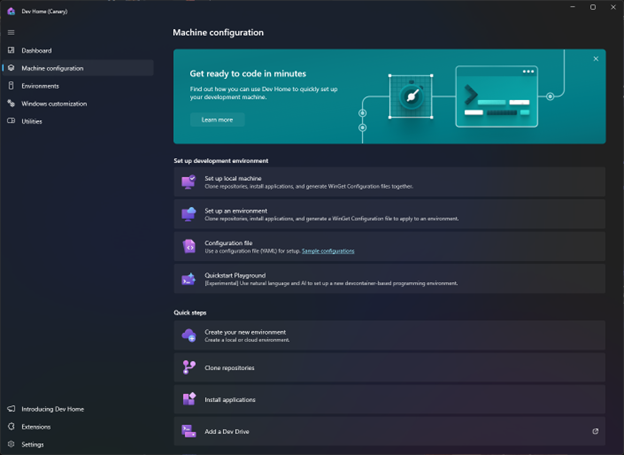
Quickstart Playground
Quickstart Playground is a new experimental feature within machine configuration that allows you to quickly spin up a development project with the power of AI. To learn more about Quickstart Playground, check out our docs.Environments
We’re making it even easier to get into your development flows by providing access to different environment types all in one place. With environments in Dev Home, you can create, connect, and configure environments such as Hyper-V virtual machines and Microsoft Dev Boxes all in one centralized view. Microsoft Dev Box support comes with the Dev Home Azure extension.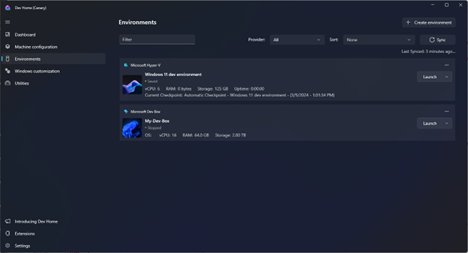
Windows customization
Windows customization in Dev Home grants you the ability to tweak additional settings within Windows to get a fully tailored experience. We’ve provided additional toggles for tweaking File Explorer along with Dev Drive insights. Dev Drive insights provides information on your Dev Drive volumes as well as suggestions for how to increase performance within them. The Windows customization feature is in active development and will get even more settings soon.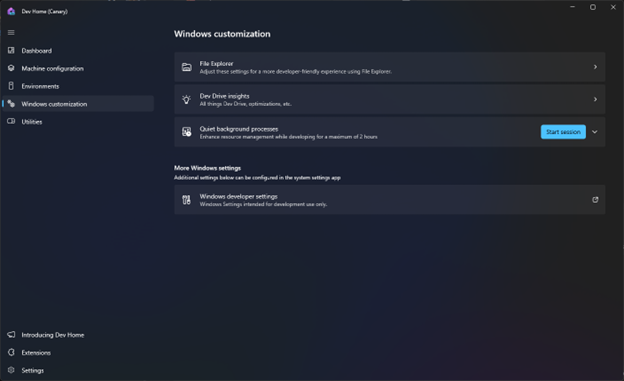
Quiet background processes
Within Windows customization lives an experimental feature called Quiet background processes. Running this feature will enable a session to defer some background processes, thus freeing up resources for development tools. Each session can run for up to two hours and you can see an analytic summary of CPU usage after it ends.Utilities
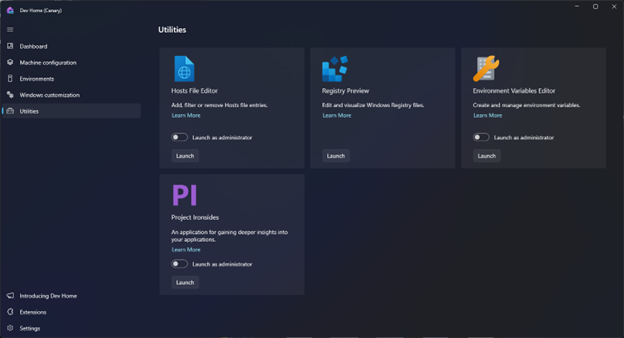
Utilities in Dev Home brings additional developer tooling to Windows. With its initial release, we’ve added the top requested PowerToys tools to Windows. These are Registry Editor, Hosts File Editor, and Environment Variables editor. We’re looking to add more utilities here in the future, and if you have any you’d like to see, please file a feature request on GitHub.