This post has been republished via RSS; it originally appeared at: Microsoft Edge Blog.
Each year, Safer Internet Day shines a light on the importance of creating safer online experiences. In K–12 education, where learning increasingly takes place on the web, IT teams are at the center of ensuring digital environments remain secure, age appropriate and ready to scale.
That is where Microsoft Edge for Business fits in. Edge for Business is built for the realities of K–12 IT environments, combining enterprise-grade security, centralized management and built-in protections directly into the browser. The goal is simple: help you create safer online experiences for students while maintaining the flexibility educators need to teach effectively.
Supporting safer browsing for students through IT governance
K–12 environments are uniquely complex. You are supporting multiple grade levels, managing diverse devices and balancing in-person, hybrid and fully digital learning models, often with limited budgets and heightened privacy expectations.
With Edge for Business, security and control are built into the browser itself. Instead of relying on a patchwork of third-party tools, you can enforce policies, manage risk and scale protections consistently across classrooms and campuses. For IT teams, this means stronger governance, fewer security gaps and less operational overhead. For students and educators, it means safer, more consistent access to the web resources they rely on every day. One way Edge for Business supports this today is through emerging, policy-driven web content filtering capabilities designed to address the needs of different age groups.
Web content filtering that enables policy driven access without limiting learning
Managing student web access is one of the most critical responsibilities for K–12 IT teams, but overly restrictive controls can disrupt instruction. Web content filtering, currently available in preview, helps IT teams take a more policy-driven approach.
Edge for Business is the only major browser with built-in, enterprise-grade web content filtering at no additional cost. Policy-based controls allow you to define which content categories are allowed or blocked based on district standards and student age groups, helping strike the right balance between protection and access.
Because these policies are applied centrally, you can reduce administrative burden, minimize policy drift and maintain consistent guardrails across devices and users. Admins can also generate customized reports to visualize web activity trends from a single, centralized location.
Learn more.
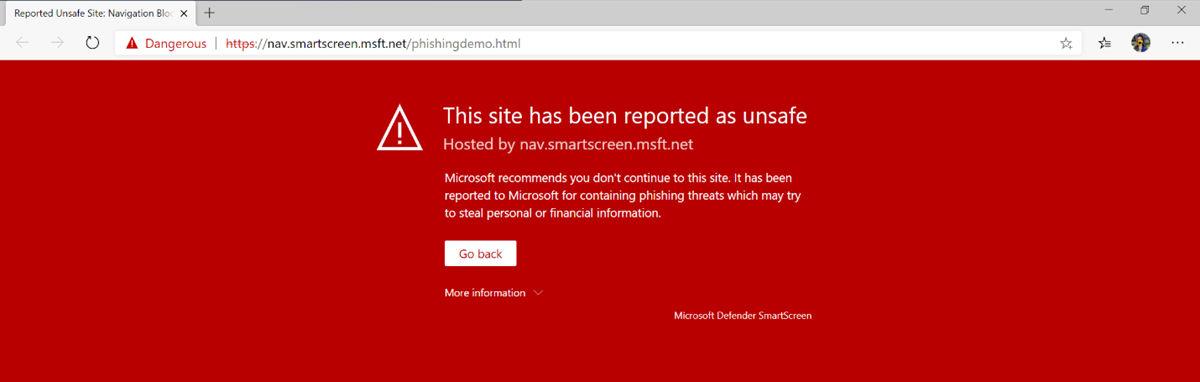
Microsoft Defender SmartScreen that helps reduce risk from online threats
Schools are frequent targets for phishing, malicious websites and deceptive downloads, posing real risks to students and staff.
Microsoft Defender SmartScreen in Edge for Business evaluates websites and downloads in real time, warning users before they interact with known malicious or deceptive content. This proactive protection helps reduce credential theft, malware infections and scareware incidents.
For IT teams, SmartScreen delivers continuous, built-in protection that runs automatically, strengthening security posture while reducing the need for manual intervention.
Learn more.
 Tracking prevention and SafeSearch that support privacy first learning
Student privacy is a core concern for every K–12 institution. Edge for Business includes built-in tracking prevention to limit unwanted third-party data collection as students browse the web.
Edge for Business also supports SafeSearch enforcement, helping ensure search results remain appropriate for educational settings and reducing exposure to unsafe content. Together, these features support responsible browsing while aligning with district policies and community expectations.
Learn more.
A smarter browser for modern K–12 environments
Safer Internet Day is a reminder that protecting students online requires more than point solutions. It requires layered browser protections that work together to guide students to appropriate content, reduce exposure to risk and support safe exploration of the web.
Edge for Business helps K–12 IT teams apply these protections directly in the browser. Policy-based web access helps guide students toward safe and age-appropriate sites, while built-in search protections and tracking prevention help reduce unwanted exposure as students research and learn. Features like Microsoft Defender SmartScreen provide an additional layer of protection by helping block malicious sites and downloads before they become an issue.
Together, these protections help create safer, more consistent online experiences for students, while giving educators flexibility and IT teams the governance and visibility needed to support learning every day with Microsoft Edge for Business.
