
This post has been republished via RSS; it originally appeared at: Windows Blog.
From the Microsoft Edge team, we want to thank and celebrate customers and users who continue to trust and partner with us to make Microsoft Edge the best browser for your environment. https://www.youtube.com/watch?v=MZt790ZVvBk Customers like GlaxoSmithKline (GSK), a global pharmaceutical firm with over 130,000 employees, set Microsoft Edge as their default browser earlier this year to improve security and simplify their IT environment. With Microsoft Edge’s dual engine advantage, GlaxoSmithKline continues to run critical legacy apps and sites across 92 countries, right alongside modern ones. “One browser that does it all”, is how Michael Freedberg, Director of Modern Workspace Engineering at GlaxoSmithKline, describes Microsoft Edge. Similarly, we applaud Bundesagentur für Arbeit (BA), the German federal employment agency, which has 95,000 employees and modernized its browser while delivering essential services during the pandemic. “We had so many applications that still depend on Internet Explorer,” Ronny Intrau, Browser Product Manager at BA, says. He describes Microsoft Edge as “one browser that handles two worlds for us.” The result is that everyone at BA, from IT to developers to employees, is better able to serve their citizen customers. We are humbled that Microsoft Edge is a strategic choice for these customers and many others as they modernize their legacy applications and browsers. This year at Ignite, Microsoft Edge continues its commitment to be the browser for business and to serve customers’ total needs, from the needs of IT Pros to developers to end-users. That means rounding out our platforms with Microsoft Edge on Linux. That means a new cloud site list management experience that simplifies setting up IE mode. And that means new innovations to help users get the most out of Microsoft 365 while using Microsoft Edge.Microsoft Edge reaches milestone on cross-platform journey: Available on Linux today
 A common request is your need for Microsoft Edge to span the breadth of operating systems in your environment. Last October, we made Microsoft Edge available on Linux in preview channels (Dev and Beta channels) and today, the browser is generally available for Linux via the stable channel. This milestone officially rounds out the full complement of major platforms served by Microsoft Edge through stable channel: Windows, Mac, iOS, Android, and now Linux. To use Microsoft Edge on Linux, users can download it from our website or retrieve it using the command line from a Linux package manager.
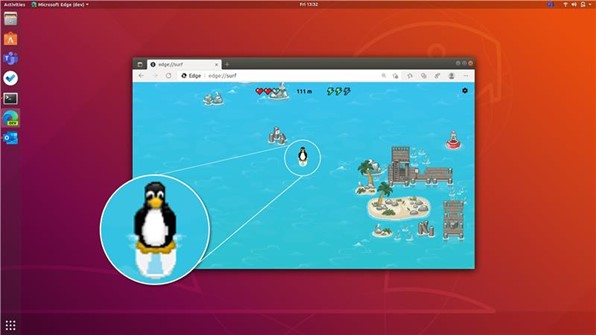
To celebrate this moment with Linux fans, the Microsoft Edge Surf game (edge://surf) has a visitor from the Linux world in the Edge 97 release’s Dev channel. Surf away!
A common request is your need for Microsoft Edge to span the breadth of operating systems in your environment. Last October, we made Microsoft Edge available on Linux in preview channels (Dev and Beta channels) and today, the browser is generally available for Linux via the stable channel. This milestone officially rounds out the full complement of major platforms served by Microsoft Edge through stable channel: Windows, Mac, iOS, Android, and now Linux. To use Microsoft Edge on Linux, users can download it from our website or retrieve it using the command line from a Linux package manager.
To celebrate this moment with Linux fans, the Microsoft Edge Surf game (edge://surf) has a visitor from the Linux world in the Edge 97 release’s Dev channel. Surf away!
IE mode: Your key to success for IE retirement in June 2022
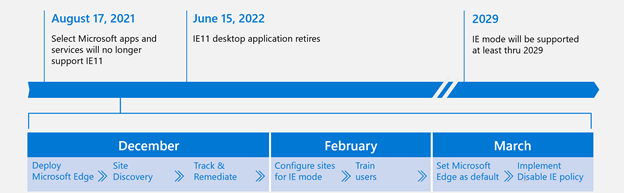 If you’ve missed the announcement, the Internet Explorer 11 (IE11) desktop application is set to retire on June 15, 2022, for certain versions of Windows 10. That’s eight months left to move to Microsoft Edge with IE mode so that you DON’T have to modernize your many legacy web apps and sites immediately. IE mode is the critical step in that modernization journey—modernize your browser to Microsoft Edge and set up IE mode first, and then take the time needed to plan and pace out your legacy web app modernization. IE mode in Microsoft Edge is supported through at least 2029, giving you an eight-year runway to modernize those legacy apps to meet today’s standards.
What is the first step you need to take to move from IE11 to IE mode in Microsoft Edge? A critical one to take NOW is blocking 30 minutes on the upcoming Monday to kick off Site Discovery. Site Discovery identifies legacy-dependent sites in your organization based on user traffic. Because this step requires active users on your network, we recommend kicking this off before the holiday downtime. Beyond this step, it typically takes customers multiple months to get from Site Discovery to broad usage in their organizations. Don’t delay and get started on your transition today.
Need help or have questions about compatibility? We offer this App Assure promise: if your web apps and sites work on Internet Explorer 11, supported versions of Google Chrome, or any version of Microsoft Edge (including Microsoft Edge Legacy), those web apps and sites should work on Microsoft Edge. If an issue arises, you can either request assistance or email us (ACHELP@microsoft.com) for remediation support at no additional cost. You can also read more about App Assure and Microsoft Edge in this blog.
Need help getting started with your transition to IE mode? Join us for a webinar and get your questions answered live.
If you’ve missed the announcement, the Internet Explorer 11 (IE11) desktop application is set to retire on June 15, 2022, for certain versions of Windows 10. That’s eight months left to move to Microsoft Edge with IE mode so that you DON’T have to modernize your many legacy web apps and sites immediately. IE mode is the critical step in that modernization journey—modernize your browser to Microsoft Edge and set up IE mode first, and then take the time needed to plan and pace out your legacy web app modernization. IE mode in Microsoft Edge is supported through at least 2029, giving you an eight-year runway to modernize those legacy apps to meet today’s standards.
What is the first step you need to take to move from IE11 to IE mode in Microsoft Edge? A critical one to take NOW is blocking 30 minutes on the upcoming Monday to kick off Site Discovery. Site Discovery identifies legacy-dependent sites in your organization based on user traffic. Because this step requires active users on your network, we recommend kicking this off before the holiday downtime. Beyond this step, it typically takes customers multiple months to get from Site Discovery to broad usage in their organizations. Don’t delay and get started on your transition today.
Need help or have questions about compatibility? We offer this App Assure promise: if your web apps and sites work on Internet Explorer 11, supported versions of Google Chrome, or any version of Microsoft Edge (including Microsoft Edge Legacy), those web apps and sites should work on Microsoft Edge. If an issue arises, you can either request assistance or email us (ACHELP@microsoft.com) for remediation support at no additional cost. You can also read more about App Assure and Microsoft Edge in this blog.
Need help getting started with your transition to IE mode? Join us for a webinar and get your questions answered live.