An example use case:
I have an Azure Blob Container named “my-org-documents”; a specific folder should be shared across all the identities. However, each identity can only write into their subfolders.
I will use the below identities as example:
test@my-org.com (AD user)
ExampleMI12 (managed identity)
I have created a path called test, managedidentity and sharedfolder under the container, so the structure is as below:
my-org-documents/test
my-org-documents/managedidentity
my-org-documents/sharedfolder
My task is completed when:
– Active Directory user “test” is able to read/write into sharedfolder
– Active Directory user “test” is able to read/write into test folder but not into managedidentity folder.
– Managed Identity “ExampleMI12” is able to read/write into sharedfolder
– Managed Identity “ExampleMI12” is able to read/write into “ExampleMI12” folder but not into test folder.
Scoping the role assignment:
In such scenario, you can achieve the target by assigning “Storage Blob Data Contributor” to the required identity while applying ABAC conditions to add more control over folder access.
Configuring the user permissions:
– Assigning “Storage Data Contributor role” to user “test” on the storage account level.
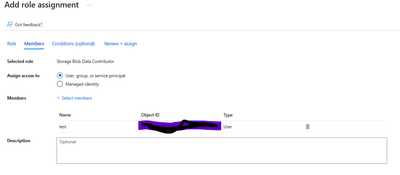
-Then, in the conditions tab, I will add the below policy:
(
(
!(ActionMatches{‘Microsoft.Storage/storageAccounts/blobServices/containers/blobs/read’} AND NOT SubOperationMatches{‘Blob.List’})
)
OR
(
@Resource[Microsoft.Storage/storageAccounts/blobServices/containers:name] StringEquals ‘my-org-documents’
AND
(
@Resource[Microsoft.Storage/storageAccounts/blobServices/containers/blobs:path] StringStartsWith ‘sharedfolder/’
OR
@Resource[Microsoft.Storage/storageAccounts/blobServices/containers/blobs:path] StringStartsWith ‘test/’
)
)
)
AND
(
(
!(ActionMatches{‘Microsoft.Storage/storageAccounts/blobServices/containers/blobs/write’})
AND
!(ActionMatches{‘Microsoft.Storage/storageAccounts/blobServices/containers/blobs/add/action’})
AND
!(ActionMatches{‘Microsoft.Storage/storageAccounts/blobServices/containers/blobs/delete’})
)
OR
(
@Resource[Microsoft.Storage/storageAccounts/blobServices/containers:name] StringEquals ‘my-org-documents’
AND
(
@Resource[Microsoft.Storage/storageAccounts/blobServices/containers/blobs:path] StringStartsWith ‘test/’
OR
@Resource[Microsoft.Storage/storageAccounts/blobServices/containers/blobs:path] StringStartsWith ‘sharedfolder/’
)
)
)
The above ABAC policy will only allow read/write access to “test” and “sharedfolder” paths, while it will deny access to all the other folders inside the “my-org-document” container or any other container inside the storage account.
Configuring the managed identity permissions:
– Assigning “Storage Data Contributor role” to managed identity “ExampleMI12” on the storage account level.
– Then, in the conditions tab, I will add the below policy:
(
(
!(ActionMatches{‘Microsoft.Storage/storageAccounts/blobServices/containers/blobs/read’} AND NOT SubOperationMatches{‘Blob.List’})
)
OR
(
@Resource[Microsoft.Storage/storageAccounts/blobServices/containers:name] StringEquals ‘my-org-documents’
AND
(
@Resource[Microsoft.Storage/storageAccounts/blobServices/containers/blobs:path] StringStartsWith ‘sharedfolder/’
OR
@Resource[Microsoft.Storage/storageAccounts/blobServices/containers/blobs:path] StringStartsWith ‘managedidentity/’
)
)
)
AND
(
(
!(ActionMatches{‘Microsoft.Storage/storageAccounts/blobServices/containers/blobs/write’})
AND
!(ActionMatches{‘Microsoft.Storage/storageAccounts/blobServices/containers/blobs/add/action’})
AND
!(ActionMatches{‘Microsoft.Storage/storageAccounts/blobServices/containers/blobs/delete’})
)
OR
(
@Resource[Microsoft.Storage/storageAccounts/blobServices/containers:name] StringEquals ‘my-org-documents’
AND
(
@Resource[Microsoft.Storage/storageAccounts/blobServices/containers/blobs:path] StringStartsWith ‘managedidentity/’
OR
@Resource[Microsoft.Storage/storageAccounts/blobServices/containers/blobs:path] StringStartsWith ‘sharedfolder/’
)
)
)
Conclusion:
In this scenario, I was able to control folder level access for AD identities by assigning a role to each identity while adding specific ABAC conditions that will add more granularity over the wide role access.
Note: For ADLS endpoint, the ABAC policy should be modified to remove the ending slash from the blob path. Similar to the below example:
(
(
!(ActionMatches{‘Microsoft.Storage/storageAccounts/blobServices/containers/blobs/read’} AND NOT SubOperationMatches{‘Blob.List’})
)
OR
(
@Resource[Microsoft.Storage/storageAccounts/blobServices/containers:name] StringEquals ‘my-org-documents’
AND
(
@Resource[Microsoft.Storage/storageAccounts/blobServices/containers/blobs:path] StringStartsWith ‘sharedfolder’
OR
@Resource[Microsoft.Storage/storageAccounts/blobServices/containers/blobs:path] StringStartsWith ‘test’
)
)
)
AND
(
(
!(ActionMatches{‘Microsoft.Storage/storageAccounts/blobServices/containers/blobs/write’})
AND
!(ActionMatches{‘Microsoft.Storage/storageAccounts/blobServices/containers/blobs/add/action’})
AND
!(ActionMatches{‘Microsoft.Storage/storageAccounts/blobServices/containers/blobs/delete’})
)
OR
(
@Resource[Microsoft.Storage/storageAccounts/blobServices/containers:name] StringEquals ‘my-org-documents’
AND
(
@Resource[Microsoft.Storage/storageAccounts/blobServices/containers/blobs:path] StringStartsWith ‘test’
OR
@Resource[Microsoft.Storage/storageAccounts/blobServices/containers/blobs:path] StringStartsWith ‘sharedfolder’
)
)
)
Note:
Please add “microsoft.storage/storageAccounts/blobServices/containers/blobs/runAsSuperUser/action” action on all conditions if:
1- The role definition contains this action, such as “Storage blob data owner”
2- The storage accounts included in this condition have hierarchical namespace enabled or might be enabled in the future.
Continue reading How to control access to identity-specific folders in Azure Blob Storage using ABAC→