
This post has been republished via RSS; it originally appeared at: Microsoft Security Blog.
Kazuar, a sophisticated malware family attributed to the Russian state actor Secret Blizzard, has been under constant development for years and continues to evolve in support of espionage-focused operations. Over time, Kazuar has expanded from a relatively traditional backdoor into a highly modular peer-to-peer (P2P) botnet ecosystem designed to enable persistent, covert access to target environments.
This upgrade aligns with Secret Blizzard’s broader objective of gaining long-term access to systems for intelligence collection. The threat actor has historically targeted organizations in the government and diplomatic sector in Europe and Central Asia, as well as systems in Ukraine previously compromised by Aqua Blizzard, very likely for the purpose of obtaining information supporting Russia’s foreign policy and military objectives.
While many threat actors rely on increasing usage of native tools (living-off-the-land binaries (LOLBins)) to avoid detection, Kazuar’s progression into a modular bot highlights how Secret Blizzard is engineering resilience and stealth directly into their tooling. By separating responsibilities across Kernel, Bridge, and Worker modules and restricting external communications to a single elected leader, Kazuar reduces its observable footprint. It also maintains flexible tasking, data staging, and multiple fallback channels for command and control (C2). Understanding this architecture helps defenders move beyond single sample analysis and instead focus on the behaviors that keep the botnet operational: leader election, inter-process communication (IPC) message routing, working directory staging, and periodic exfiltration.
Kazuar’s capabilities and tradecraft have been widely documented by the security research community, and prior reporting, including Unit 42’s write-up and a recent deep dive into its loader capabilities, remains relevant today. This blog is an in-depth analysis of Kazuar’s progression from a single, monolithic framework into a modular bot ecosystem composed of three distinct module types, each with clearly defined roles. Together, these components distribute functionality across the P2P botnet, enabling flexible configuration, lower observability, and broad tasking while minimizing opportunities for detection.
Delivery
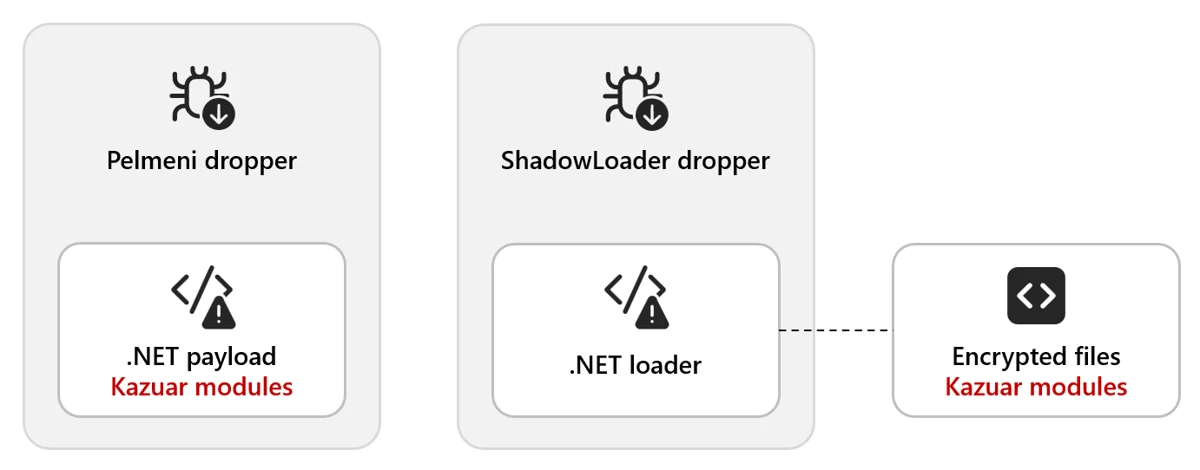
Kazuar is delivered through multiple dropper variants. In one observed method, the Pelmeni dropper embeds the encrypted second-stage payload directly within the dropper as an encrypted byte array. The payload is often bound to the target environment (for example, encrypted using the target hostname) so it only decrypts and executes on the intended host.
In another method, the dropper deploys a small .NET loader alongside the final payload. The dropper then invokes the loader (often configured as a COM object) and supplies the decrypted payload, allowing it to load and execute the Kazuar modules.
Module types
There are three distinct types of modules: Kernel, Bridge, and Worker. The next sections explain the functionality contained in each type and how they interact with each other.
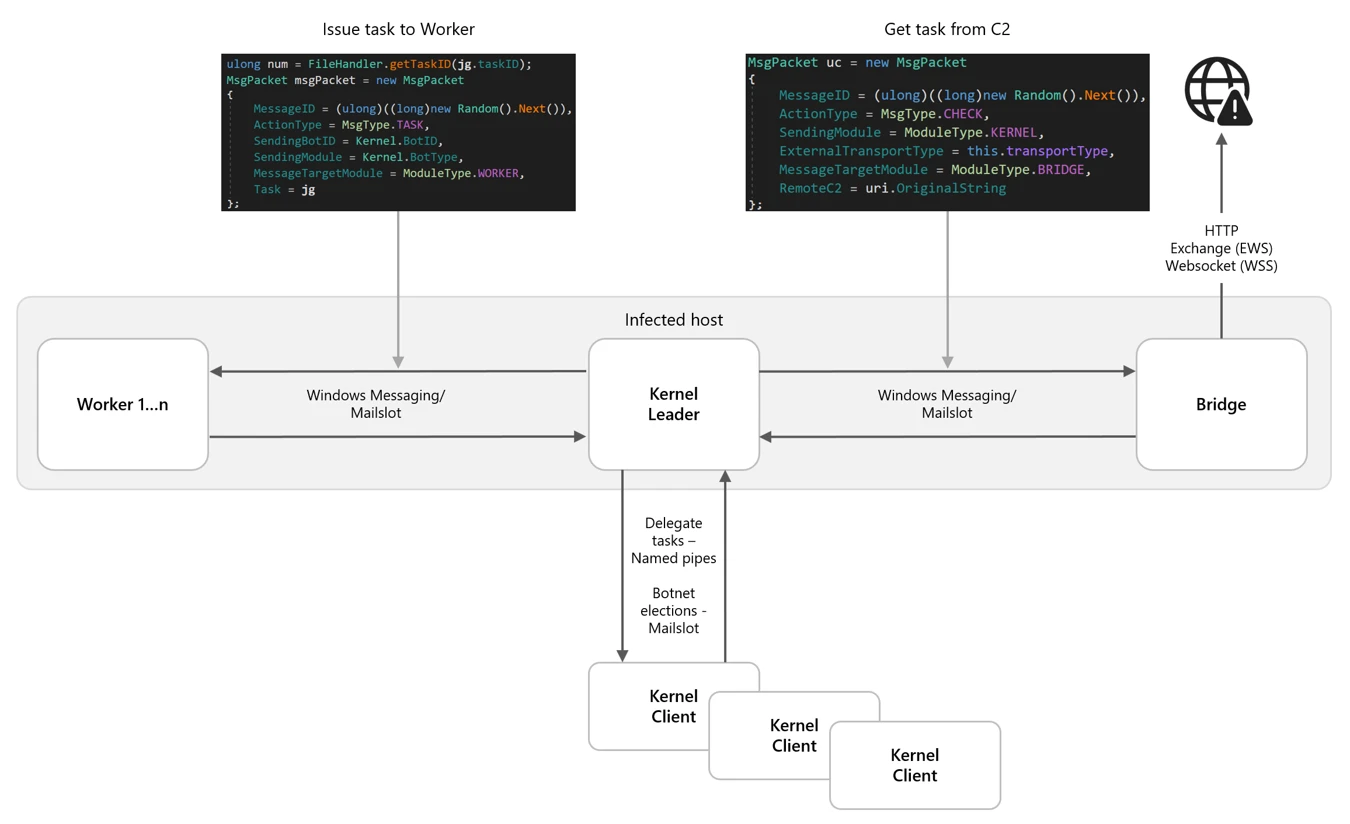
This diagram shows the general interactions between a set of modules on a single host. Each infected host needs to have all three modules to create the full P2P network:
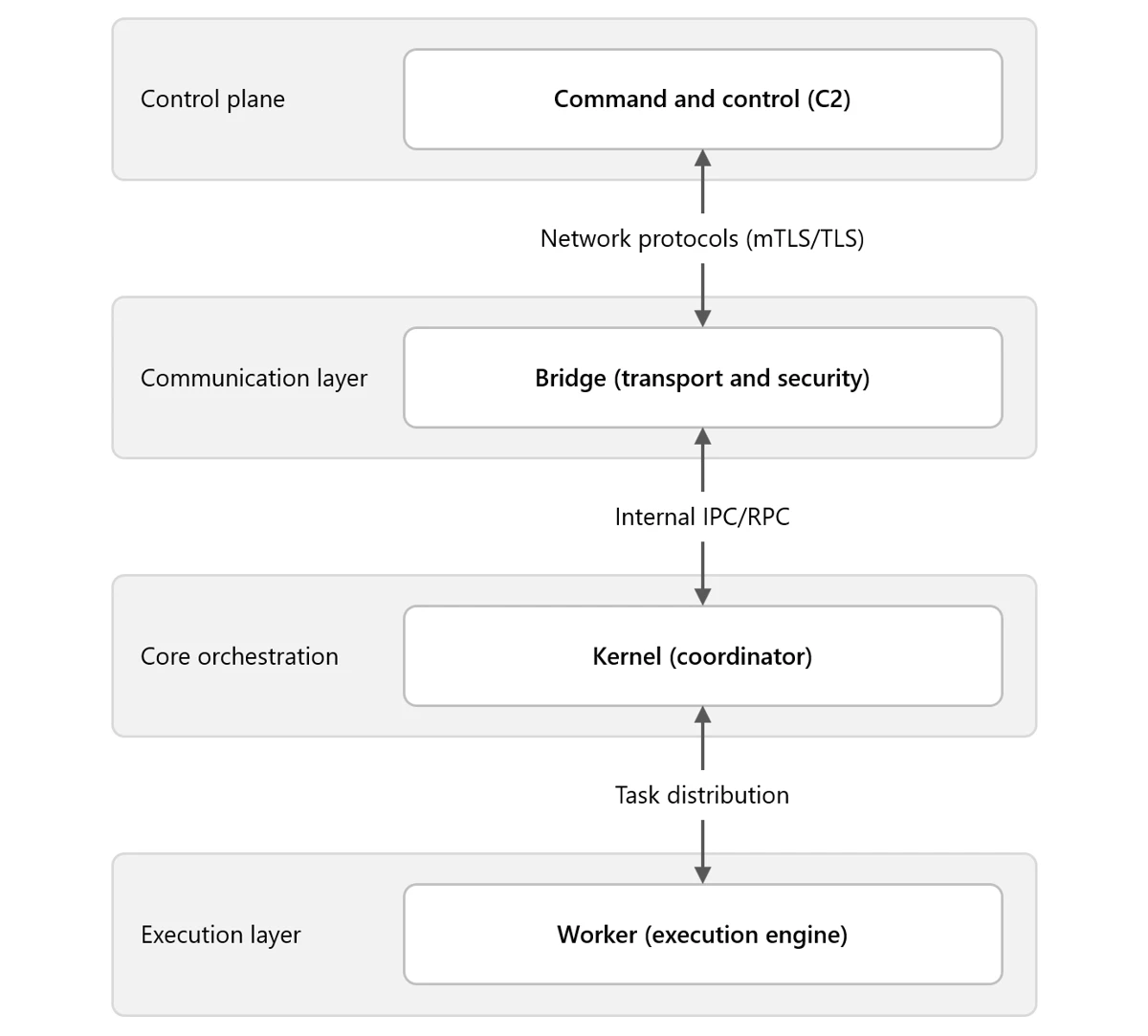
Note: We use ALL CAPS when referencing identifiers taken verbatim from the malware (for example, internal module and thread names, message types, configuration keys, or mode/flag values).
Type: Kernel
The Kernel module serves as the central coordinator for the botnet. It issues tasks to Worker modules, manages communication with the Bridge module, and maintains logs of actions and collected data. Early in execution, the Kernel module performs extensive anti-analysis and sandbox checks. These behaviors are well documented in the Unit 42 write-up and include standard checks such as:
- Checking for running processes containing analysis tools
- Checking for canary files on the desktop
- Checking the loaded process for sandbox-related DLLs
Module configuration
Once these checks are passed, the Kernel module sets up the environment based on numerous configuration options. Previous versions of Kazuar have used separate files containing the configuration information, but these are now embedded in the samples and have significantly increased the number of configurations available to the malware family.
The configuration set can vary across 150 different configuration types, C2 communication infrastructures, or tasking options generally defined by eight functional categories. Any operational configuration in use can be updated at any time from the C2 server. The following table contains some examples and descriptions of the categories.
| Category | Example configuration options | Description |
| Communication and transport | transport, ws_transport, heart_beat, ews_url, keywords | Controls how the malware communicates with C2 infrastructure, including HTTP and WebSocket transports, Exchange Web Services (EWS) email-based C2, heartbeat intervals, and connection parameters |
| Execution and injection | inject_mode, delegate_enabled, live_in_scrcons, modules | Defines how the malware executes and persists in memory, including process injection techniques (inject/remote/zombify/combined/single), module loading, and process hosting strategies |
| Security bypass | amsi_bypass, wldp_bypass, etw_bypass, antidump_methods, hinder_enabled | Configures evasion techniques to avoid detection by security tools, including bypasses for Antimalware Scan Interface (AMSI), Windows Lockdown Policy (WLDP), Event Tracing for Windows (ETW), and anti-debugging/anti-dump protections |
| Data exfiltration timing | send_hour_min, send_hour_max, send_on_weekend, max_send_chunk, send_times_max | Controls when and how collected data is exfiltrated, including working hours restrictions (8:00 AM – 8:00 PM default), weekend behavior, chunk sizes, retry limits, and rate limiting to blend with normal network traffic |
| Task management | task_time_limit, task_max_store_time, solve_threads, max_solve_tries, max_deadlock_ivl | Manages execution of received tasks/commands, including timeouts, thread pool sizing, retry logic, deadlock detection, and task queuing/storage parameters |
| File collection | autos_patterns, autos_folders, autos_min_fsize, autos_max_fsize, autos_max_size, autos_file_ivl | Configures automated file harvesting, including target file patterns, folder paths to scan, file size filters (min/max), total collection limits, and scanning intervals for continuous collection operations |
| System state | working_dir, agent_uuid, hostname, botID, start_attempts, was_shutdown, first_sysinfo_do | Maintains agent identity and operational state, including unique identifiers, working directories, startup tracking, shutdown flags, and initial reconnaissance behavior |
| Monitoring | keylog_enabled, keylog_size, autos_do_scrshot, autos_do_steal, autos_scrs_ivl, max_total_peeps, peep_rules | Controls active surveillance capabilities, including keylogging (buffer size, flush intervals), screenshot capture, credential theft, Messaging Application Programming Interface (MAPI) email monitoring, and configurable monitoring rules/intervals. |
This configuration exposes three internal communication mechanisms:
- Window Messaging
- Mailslot
- Named pipes
There are also three different communication protocols for external communication:
- Exchange Web Services (EWS)
- HTTP
- WebSockets (WSS)
They typically contain redundant or fallback communications to maintain access in the event of the failure of a single point of contact.
Leadership election
One of the methods that Kazuar uses to limit external communication is to use a single Kernel leader per botnet. In this architecture, the Kernel leader is the one elected Kernel module that communicates with the Bridge module on behalf of the other Kernel modules, reducing visibility by avoiding large volumes of external traffic from multiple infected hosts.
There are several conditions that determine whether a new leader needs to be elected among participating Kernel modules:
- There currently is no leader.
- The leader announces it is shutting down.
- The leader announces it is logging off.
- If an election does not result in a leader due to an error, a new election will be called.
Elections occur over Mailslot, and the leader is elected based on the amount of work (length of time the Kernel module has been running) divided by interrupts (reboots, logoffs, process terminated). Once a leader is elected, it announces itself as the leader and tells all other Kernel modules to set SILENT.
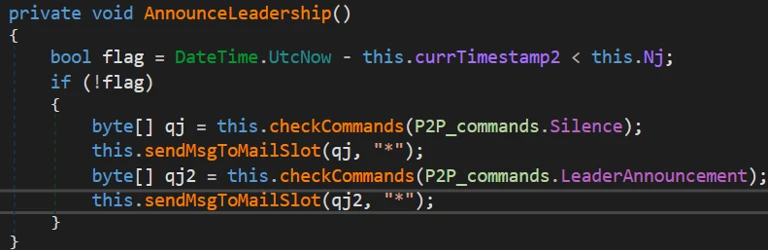
Only the elected leader is not SILENT, which allows the leader Kernel module to log activity and request tasks through the Bridge module. Client Kernel modules still participate in internal IPC (for elections, status, and delegated work), but they don’t independently request tasks from the Bridge module. Before entering SILENT mode, each client Kernel module sends a CLIENT announcement, which causes the leader to add it to the maintained agent list.
With the hierarchy established, the work can be done. Several threads and communication types are initialized to perform the work and communicate between modules.
REMO thread
The REMO thread sets up a named pipe channel between Kernel modules so the leader can exchange messages with other Kernels. By default, the pipe name is the MD5 hash of pipename-kernel-<Bot version>, which results in a pipe path such as \\.\pipe\82760B84F1D703D596C79B88BA4FAC1E. The name could be modified through additional strings passed into the name-building function, but this pattern is the default. This channel lets the leader target specific client Kernel modules when delegating work.
Messages over this pipe are AES-encrypted and begin with a PING/PONG handshake. After that, the leader could:
- Request another Kernel module’s logs
- Assign tasks to a client Kernel module
Because only the Kernel leader is allowed to request tasks through the Bridge module, it distributes work to the other Kernel clients over named pipes. If the leader receives a task destined for a different bot, it forwards the task to the appropriate client Kernel module through this channel.
MSGW thread
For Kernel-to-Worker and Kernel-to-Bridge communication, Kazuar uses one of two IPC mechanisms:
- Window Messaging [default selection]
- Registers a hidden window
- Mailslot
- Registers a Mailslot
Based on its initial configuration, Kazuar selects one of these communication types to listen for incoming communication, with the default being Windows Messaging.
Window Messaging setup
This technique involves creating a hidden window and registering a ClassName and WindProc. The ClassName is simply the module name (for example, Bridge), and the WindProc is the general-purpose message handler.
This allows other processes to look up the window by ClassName and use several different APIs to send a message to that window. When the window receives a message, the WindProc is executed to parse it and carry out the requested action.
Mailslot setup
The Mailslot name is derived by hashing the string “mailslot-” plus the module name (Bridge/Kernel/Worker). The configuration can optionally append an additional identifier (empty by default), which allows deployments to create distinct Mailslot namespaces when needed.

The string is hashed and used as the name to create the Mailslot: \\.\mailslot\<generated hash>.
A thread is created that checks every three seconds for new messages using the API GetMailslotInfo, and when it finds one, it parses the incoming message.
Message types
Regardless of what message delivery system is selected, the message is parsed by the same handler function. For the Kernel module, this message parsing function has numerous expected communication messages, since it controls all the modules execution flows.
The following message table describes the incoming and outgoing messages for the Kernel, what actions precipitate a message, and what the Kernel does when it receives each message:
| Kernel outgoing MsgType | MsgType reason | Module(s) | Kernel incoming MsgType | Kernel actions |
| TASK | – Issue task to worker | Worker | TASK_RESULT | – Response message is logged by the Kernel – Result file is created with results of the task |
| CHECK | – Only the leader can send this – Request new tasks from remote C2 | Bridge | CHECK_RESULT | – If the C2 has tasks, the Kernel creates a task file – Can also receive alternate C2 URLs that are added to the stored configuration |
| SYN | – Target module needs to request a new config | Bridge, Worker | GET_CONFIG | – Kernel sends its configuration to the requesting module |
| (Worker thread – PEEP) | – Configuration-based | Worker | PEEP | – PEEP result file is written unless it has reached its configured max PEEP number |
| SEND | – Send result file to be forwarded to C2 | Bridge | SEND_RESULT | – Result file is deleted |
| (Worker thread – KEYL) | – Configuration-based | Worker | KEYLOG | – Writes keylog data to keylog output file |
| (Multiple Filesystem Worker threads) | – Configuration-based | Worker | AUTOS | – Writes AUTO data to AUTOS output files |
SEND thread
The configuration specifies an external communication method from the available communication modes
- HTTP [default selection]
- Web Socket Server (WSS)
- Exchange Web Server (EWS)
These configurations can be changed at any point when the C2 sends a new configuration, or a change communication task is issued to it. It also contains a heartbeat timer that is defined in the configuration for the SEND actions to occur with the default timer being every hour. There are also working timers that can install a blackout period on communications to blend in with the target environment.

Note: Only the elected Kernel leader can perform the following actions:
- If the Kernel has task results
- Read in the task file
- Send SEND message to Bridge with the task result file
- Get new tasks from Bridge
- Send CHECK message to Bridge
Table 2 describes what the Kernel expects in return for these messages. The messages are sent asynchronously and recorded as tasks by the Kernel.
There is also a failsafe communication method that allows the Kernel to directly contact the remote C2 if the Kernel is unable to communicate with the Bridge module. Essentially, if all communication attempts fail and a certain amount of time has elapsed, the Kernel module requests tasks directly from the remote C2.
SOLV thread
This thread executes when the heartbeat timer expires to handle any tasks that the Kernel is tracking. This thread performs several functions related to the current task list:
- Loop through the list of current tasks
- Check if aborted flag is true
- Issue TaskKill message to the worker (Window Messaging)
- Remove task from task list
- Check if task has exceeded the configured max working time for task
- Issue TaskKill message to the worker (Window Messaging)
- Set aborted flag for task to true
- Remove task from task list
- Check if aborted flag is true
- Read in all task files from the working directory
- If the task is new
- Add task to task list
- If the task is new
Type: Bridge
The Bridge module provides the botnet’s external communications layer, acting as the proxy between the leader Kernel module and the C2 server regardless of the transport method selected. Since each Kernel module has its own Worker and Bridge module, if a new leader is elected, then that new leader Kernel module uses its Bridge module for communication. It typically has the same default configuration as the Kernel module but does contain a few different operations that set up the initial infection.
The Bridge module initializes its core object with basic metadata and instantiates two supporting components that provide the module’s primary functionality:
- Server Communication module
- Task Handling module
The module registers handlers for two system-level events. These handlers define how the module should respond when specific system events occur:
- SystemEvents.SessionEnded
- SystemEvents.PowerModeChanged
When an event is triggered, the corresponding handler function is invoked, allowing the module to determine the appropriate action for that event. Events are typically ignored unless they require explicit handling.
The module only terminates when the system is shutting down; all other events do not affect its lifetime. Based on its initial configuration, which should match the Kernel module configuration, it selects either Mailslot or Windows Messaging as the IPC mechanism used for communication between modules. Once the setup steps is completed, the module is ready to proxy communication between the leader Kernel module and the C2 server.
Type: Worker
The initial Worker configuration mirrors the structure of other module configurations and follows the same overall layout. Based on its initial configuration, the Worker module selects either Mailslot or Windows Messaging as the IPC mechanism used to communicate between modules. The default configuration for this botnet uses Windows Messaging; further details on the window setup are described below.
During initialization, the Worker configuration instantiates several objects responsible for the module’s primary functionality. Each object is executed within its own named thread. These components include:
- Task Solver
- Handles task tracking
- Peep
- Hooks windows events
- Has a max number of windows to hook set by the configuration
- Keylogger
- Filesystem
- GINFO – Gather system info
- GFIL – Gather file listings
- Recent files
- Desktop
- Malware working directory
- GHOO – Window information
- GMAP – Gather MAPI info
- Email information
Data collected by these components is aggregated, encrypted, and written to the malware’s working directory, where it is staged for subsequent exfiltration to the C2 server.
Botnet operations
With the botnet setup complete, configurations instantiated, and a leader elected, Kazuar transitions into its steady state operational phase. In this state, the elected Kernel leader centrally coordinates tasking and data collection across participating modules while maintaining a deliberately low observable footprint. Worker modules execute tasks asynchronously based on configuration and assignments received from the Kernel, collecting system, file, window, and user activity data according to defined schedules and limits.
Module-to-module messaging
When one module needs to communicate with another, all required information is assembled into a structured message packet. Multiple packet formats are defined, with the specific format determined by the message type and intended action.
These message packets are constructed using Google Protocol Buffers (Protobuf), which provides a structured, schema‑based format similar in concept to JSON. Using Protobuf allows the malware to efficiently serialize, transmit, and parse messages through standard library functions.
Messages destined for the Bridge module include additional fields that describe how the request should be forwarded to the remote C2 infrastructure. These fields specify transport level details, including the external communication mechanism to be used.
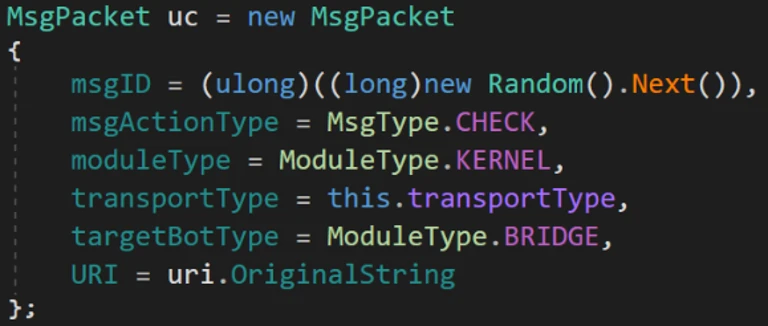
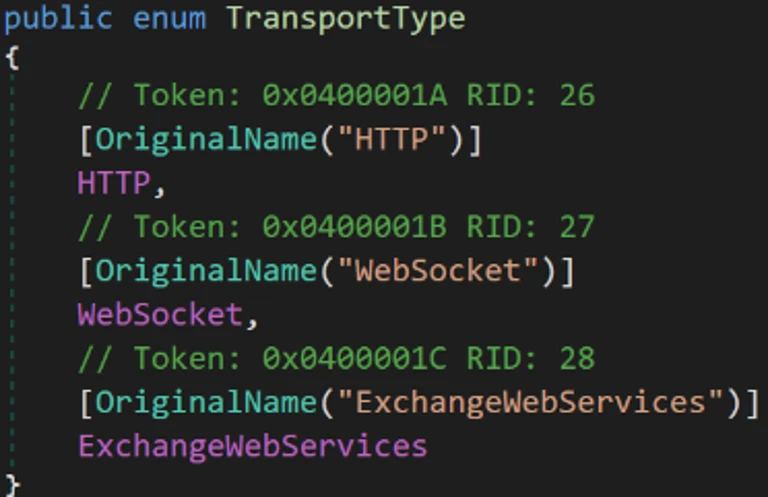
The TransportType field can specify one of three supported communication methods. The default transport is typically HTTP, using the C2 URLs in the default configuration.
When sending a message, the dispatch function examines the contents of the message packet to determine the appropriate delivery mechanism, resolves the corresponding Mailslot name or window class identifier, and routes the packet to the intended module.
For example, if the TransportType is set to EWS, the packet is delivered to the Bridge module, which then uses its Exchange communication component to encapsulate the data and deliver it to the remote C2 server via email.
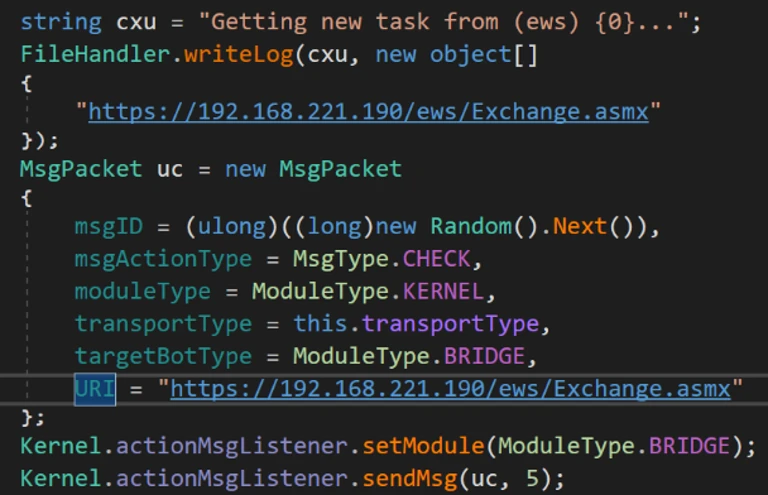
Messages originate from the Kernel leader, except for a couple of worker tasks that send messages to the Kernel module based on their configuration.
Working directory
Kazuar uses a dedicated working directory as a centralized on‑disk staging area to support its internal operations across modules. This directory is defined through configuration and is consistently referenced using fully qualified paths to avoid ambiguity across execution contexts. Within the working directory, Kazuar organizes data by function, isolating tasking, collection output, logs, and configuration material into distinct locations. This design allows the malware to decouple task execution from data storage and exfiltration, maintain operational state across restarts, and coordinate asynchronous activity between modules while minimizing direct interaction with external infrastructure. Collected artifacts are typically written incrementally, encrypted before staging, and retained locally until explicitly forwarded to the C2 infrastructure through the Bridge module.
Within this working directory, Kazuar maintains separate storage locations for the following functional data types:
- Peeps
- Autos
- Files
- Hashes
- Result files
- Task files
- Config files
- Common wordlist
- Common exe
- Logs
- Keylogger
This structured use of the filesystem enables Kazuar to operate modularly, maintain persistence state across leadership changes or reboots, and blend malicious activity into routine file system usage.
Module tasks
The list of commands available for the Worker modules to perform is extensive and has many features, from arbitrary command/script execution to preformatted forensic data collection functions, as described in the Unit 42 blog.
The Kernel module task handler has a few additional functions that handle commands issued from the leader Kernel module.
| Task | Description |
| kernel | A list of commands to be executed by the Kernel module |
| delegate | Send command via Named pipe to targeted Kernel module |
| modules | Handles the list of agents maintained by the Kernel module list – List modules in the agents list clear – Clear list of agents add – Add an agent to the list by ID remove – Remove an agent from the list by ID |
| autoslist | Gets list of hashes and files collected by autos |
| autosget | Sends all of the autos files to requesting module and deletes autos files |
| autosdel | Deletes all autos files |
System info gathering
System info gathering is often enabled by default in the configuration. This causes an initial collection of system information when the agent starts up. This task collects an extensive amount of information about the system and its user.
| Optional OS features Installed AV AMSI provider Security packages AppLocker setting Logical drives USB devices Network adapters ARP tables Network connections Network shares RDP hints Running processes Loaded modules (current process) | Pipe list Active windows Recent documents Outlook downloads Recent items OS info System Boot events Hardware info User info Local users Logon sessions User profiles Special folders Explorer Run command history | Explorer typed paths Explorer search history Environment variables UAC settings Internet settings DNS cache Network PowerShell versions WSUS settings Installed software Hot patches Update history Services Drivers |
Screenshots are also taken through various methods and saved for exfiltration both automatically through the configuration or when a task is issued.
Who is Secret Blizzard?
The United States Cybersecurity and Infrastructure Security Agency (CISA) has attributed Secret Blizzard to Center 16 of Russia’s Federal Security Service (FSB), which is one of Russia’s Signals Intelligence and Computer Network Operations (CNO) services responsible for intercepting and decrypting electronic data as well as the technical penetration of foreign intelligence targets. Secret Blizzard overlaps with activity tracked by other security vendors as VENOMOUS BEAR, Uroburos, Snake, Blue Python, Turla, WRAITH, and ATG26.
Secret Blizzard is known for targeting a wide array of verticals, but most prominently ministries of foreign affairs, embassies, government offices, defense departments, and defense-related companies worldwide. Secret Blizzard focuses on gaining long-term access to systems for intelligence collection using extensive resources such as multiple backdoors, including some with peer-to-peer functionality and C2 communication channels. During intrusions, the threat actor collects and exfiltrates documents, PDFs, and email content. In general, Secret Blizzard seeks out information of political importance with a particular interest in advanced research that might impact international political issues.
Mitigation and protection guidance
To harden networks against the Secret Blizzard activity listed above, defenders can implement the following:
Strengthen Microsoft Defender for Endpoint configuration
- Microsoft Defender XDR customers can implement attack surface reduction rules to harden an environment against techniques used by threat actors.
- Enable network protection in Microsoft Defender for Endpoint.
- Ensure that tamper protection is enabled in Microsoft Defender for Endpoint.
- Run endpoint detection and response (EDR) in block mode so that Microsoft Defender for Endpoint can block malicious artifacts, even when your non-Microsoft antivirus does not detect the threat or when Microsoft Defender Antivirus is running in passive mode.
- Configure investigation and remediation in full automated mode to let Microsoft Defender for Endpoint take immediate action on alerts to resolve breaches, significantly reducing alert volume.
Strengthen Microsoft Defender Antivirus configuration
- Turn on PUA protection in block mode in Microsoft Defender Antivirus.
- Turn on cloud-delivered protection in Microsoft Defender Antivirus or the equivalent for your antivirus product to cover rapidly evolving threat actor tools and techniques.
- Turn on Microsoft Defender Antivirus real-time protection.
Strengthen operating environment configuration
- Encourage users to use Microsoft Edge and other web browsers that support SmartScreen, which identifies and blocks malicious websites, including phishing sites, scam sites, and sites that host malware.
- Implement PowerShell execution policies to control conditions under which PowerShell can load configuration files and run scripts.
- Turn on and monitor PowerShell module and script block logging.
Microsoft Defender detections
Microsoft Defender customers can refer to the list of applicable detections below. Microsoft Defender coordinates detection, prevention, investigation, and response across endpoints, identities, email, apps to provide integrated protection against attacks like the threat discussed in this blog.
| Tactic | Observed activity | Microsoft Defender coverage |
| Execution | Execution of malware components | Microsoft Defender Antivirus – Kazuar (OA, OB) – KazuarModule – KazuarLoader – ShadowLoader – ToxicDust Microsoft Defender for Endpoint – Secret Blizzard actor activity detected |
Microsoft Security Copilot
Microsoft Security Copilot is embedded in Microsoft Defender and provides security teams with AI-powered capabilities to summarize incidents, analyze files and scripts, summarize identities, use guided responses, and generate device summaries, hunting queries, and incident reports.
Customers can also deploy AI agents, including the following Microsoft Security Copilot agents, to perform security tasks efficiently:
- Threat Intelligence Briefing agent
- Phishing Triage agent
- Threat Hunting agent
- Dynamic Threat Detection agent
Security Copilot is also available as a standalone experience where customers can perform specific security-related tasks, such as incident investigation, user analysis, and vulnerability impact assessment. In addition, Security Copilot offers developer scenarios that allow customers to build, test, publish, and integrate AI agents and plugins to meet unique security needs.
Threat intelligence reports
Microsoft Defender XDR customers can use the following threat analytics reports in the Defender portal (requires license for at least one Defender XDR product) to get the most up-to-date information about the threat actor, malicious activity, and techniques discussed in this blog. These reports provide the intelligence, protection information, and recommended actions to prevent, mitigate, or respond to associated threats found in customer environments.
Microsoft Security Copilot customers can also use the Microsoft Security Copilot integration in Microsoft Defender Threat Intelligence, either in the Security Copilot standalone portal or in the embedded experience in the Microsoft Defender portal to get more information about this threat actor.
Indicators of compromise
| Indicator | Type | Description |
| 69908f05b436bd97baae56296bf9b9e734486516f9bb9938c2b8752e152315d4 | SHA-256 | hpbprndiLOC.dll – Kazuar Loader |
| c1f278f88275e07cc03bd390fe1cbeedd55933110c6fd16de4187f4c4aaf42b9 | SHA-256 | Decrypted Kernel Module |
| 6eb31006ca318a21eb619d008226f08e287f753aec9042269203290462eaa00d | SHA-256 | Decrypted Bridge Module |
| 436cfce71290c2fc2f2c362541db68ced6847c66a73b55487e5e5c73b0636c85 | SHA-256 | Decrypted Worker Module |
References
- Over the Kazuar’s Nest: Cracking Down on a Freshly Hatched Backdoor Used by Pensive Ursa (Aka Turla)
- 🇷🇺 COMmand & Evade: Turla’s Kazuar v3 Loader
- Russia’s FSB malign activity: factsheet
- Hunting Russian Intelligence “Snake” Malware
Learn more
For the latest security research from the Microsoft Threat Intelligence community, check out the Microsoft Threat Intelligence Blog.
To get notified about new publications and to join discussions on social media, follow us on LinkedIn, X (formerly Twitter), and Bluesky.
To hear stories and insights from the Microsoft Threat Intelligence community about the ever-evolving threat landscape, listen to the Microsoft Threat Intelligence podcast.
The post Kazuar: Anatomy of a nation-state botnet appeared first on Microsoft Security Blog.