
This post has been republished via RSS; it originally appeared at: Microsoft Tech Community - Latest Blogs - .
Today, we are excited to announce a wonderful collaboration between Multivariate Anomaly Detector and SynapseML , which joined together to provide a solution for developers and customers to do multivariate anomaly detection in Synapse. This new capability allows you to detect anomalies quickly and easily in very large datasets and databases, perfectly lighting up scenarios like equipment predictive maintenance. For those who is not familiar with predictive maintenance, it is a technique that uses data analysis tools and techniques to detect anomalies in the operation and possible defects in equipment and processes so customers can fix them before they result in failure. Therefore, this new capability will benefit customers who have a huge number of sensor data within hundreds of pieces of equipment, to do equipment monitor, anomaly detection, and even root cause analysis.
Introduction of Multivariate Anomaly Detector and SynapseML
Multivariate Anomaly Detector (MVAD) is an AI service in Cognitive Services, which provides APIs that further enable developers by easily integrating advanced AI for detecting anomalies from groups of sensor data, without the need for machine learning knowledge or labeled data. This service helps you to proactively protect your complex systems such as software applications, servers, factory machines, spacecraft, or even your business, from failures.
SynapseML v0.9.5 (previously MMLSpark), is an open-source library that aims to simplify the creation of massively scalable machine learning pipelines. SynapseML unifies several existing ML Frameworks and new MSFT algorithms in a single, scalable API that’s usable across Python, R, Scala, and Java.
Where to use this new capability?
SynapseML is Open Source and can be installed and used on any Spark 3 infrastructure including your local machine, Databricks, Synapse Analytics, and others. Therefore, you have multiple choices to experience this capability.
Can’t wait? You could check out a detailed recipe of this capability: [Demo] Multivariate Anomaly Detector with SynapseML. Also, you could look down for better and quicker understanding.
Getting started is simple!
Let’s take Synapse Analytics for example and dive into the following steps!
Create resources in Azure Portal
- Create an Anomaly Detector to get access to the capability of Multivariate Anomaly Detector.
- Create a resource for Azure Synapse Analytics to use the Synapse Studio.
- Create a Storage account resource to upload your data for model training and anomaly detection.
- Create a Key Vault to hold Anomaly Detector key and Storage Connection String.
- Go to Key Vault > Access policies, and grant the Azure Synapse workspace MSI permissions to read secrets from Azure Key Vault.
- Create a secret in Key Vault to hold Anomaly Detector key
- Create a secret in Key Vault to hold Connection String of Storage account
Log in Azure Synapse Analytics and create a notebook
- Log in Azure Synapse Analytics and create a new Notebook for coding.
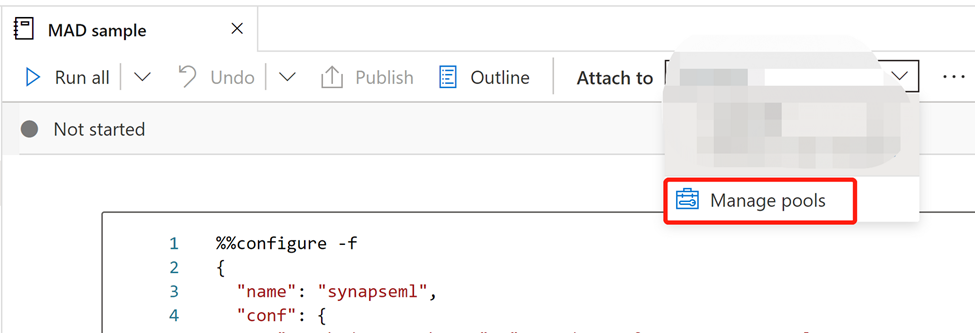
- Select ‘Manage pools’ to create a new if you don’t have one.
Start coding
1.Install the latest version of SynapseML.
You can also install SynapseML in Spark Packages, Databricks, Docker, etc. Please refer to SynapseML homepage. For Spark 3.2 pool:
%%configure -f
{
  "name": "synapseml",
  "conf": {
      "spark.jars.packages": " com.microsoft.azure:synapseml_2.12:0.9.5 ",
      "spark.jars.repositories": "https://mmlspark.azureedge.net/maven",
      "spark.jars.excludes": "org.scala-lang:scala-reflect,org.apache.spark:spark-tags_2.12,org.scalactic:scalactic_2.12,org.scalatest:scalatest_2.12,io.netty:netty-tcnative-boringssl-static",
      "spark.yarn.user.classpath.first": "true"
  }
}
2. Load your data
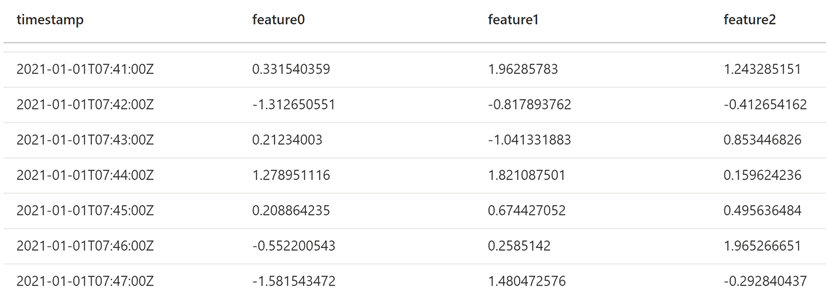
Load your data for training, which is the CSV file stored in blob or another place. You could use our sample data(download here).
Compose your data as following format in a CSV file, and upload it to a cloud storage like Blob Storage. The timestamp column should be in ISO8601 format, and the feature columns should be string type.
3.Training Model
Use FitMultivariateAnomaly function to train a MVAD model.
from notebookutils import mssparkutils
from synapse.ml.cognitive import *

#Input your key vault information.
anomalyKey = mssparkutils.credentials.getSecret("[key_vault_name]", "[Secret_name]")
connectionString = mssparkutils.credentials.getSecret("[key_vault_name]", "[Connectionstring_name]")

#Specify information about your data.
startTime = "2021-01-01T00:00:00Z"
endTime = "2021-01-02T09:18:00Z"
timestampColumn = "timestamp"
inputColumns = ["feature0", "feature1", "feature2"]
#Specify the container you created in Storage account, you could also initialize a new name here, and Synapse will help you create that container automatically.
containerName = "[container_name]"
#Set a folder name in Storage account to store the intermediate data.
intermediateSaveDir = "[intermediate_folder]"

simpleMultiAnomalyEstimator = (FitMultivariateAnomaly()
    .setSubscriptionKey(anomalyKey)
#In .setLocation, use lowercase letter like: southcentralus.
    .setLocation("[anomaly_detector_resource_region]")
    .setOutputCol("[anomaly_result_column]")
    .setStartTime(startTime)
    .setEndTime(endTime)
    .setContainerName(containerName)
    .setIntermediateSaveDir(intermediateSaveDir)
    .setTimestampCol(timestampColumn)
    .setInputCols(inputColumns)
    .setSlidingWindow(200)
    .setConnectionString(connectionString))
4.Inference
Use below code block to do inference with extra part of data.
startInferenceTime = "2021-01-02T09:19:00Z"
endInferenceTime = "2021-01-03T01:59:00Z"
result = (model
      .setStartTime(startInferenceTime)
      .setEndTime(endInferenceTime)
      .setOutputCol("result")
      .setTimestampCol(timestampColumn)
      .setInputCols(inputColumns)
      .transform(df))

display(result)
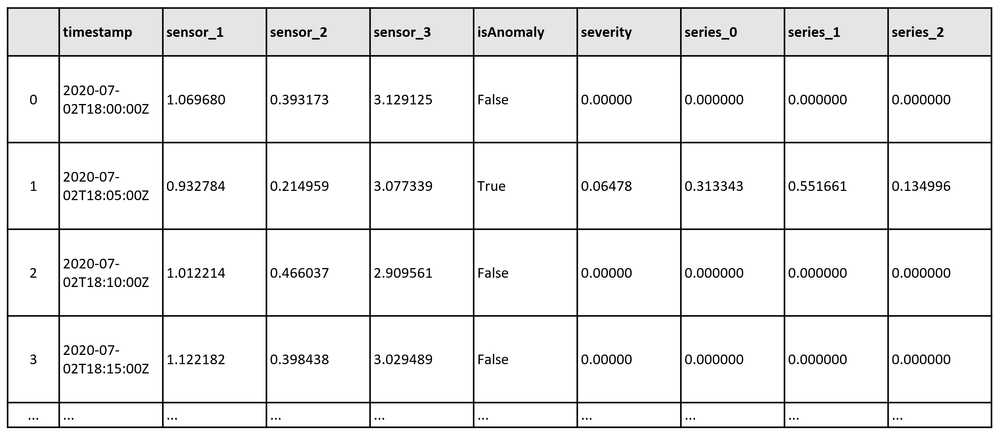
After format the contributors column that stores the contribution score from each sensor to the detected anomalies, you could get a dataframe like this:
Resources
About Anomaly Detector
- Learn about what is Multivariate Anomaly Detector.
- SynapseML documentation with Multivariate Anomaly Detector feature.
- Recipe: Cognitive Services – Multivariate Anomaly Detector.
- Need support? Join the Anomaly Detector Community.
About Synapse
- Quickstart: Configure prerequisites for using Cognitive Services in Azure Synapse Analytics
- Visit SynpaseML new website for the latest docs, demos, and examples.
- Learn more about Synapse Analytics.
- Read about the SynapseML v0.9.5 release on GitHub.