
This post has been republished via RSS; it originally appeared at: Microsoft Tech Community - Latest Blogs - .
Here are the steps you can follow to configure the Config Server on Azure Spring Apps which uses SSH authentication to connect to a git repository on GitHub.
Create your keys using the following command on your terminal
ssh-keygen -m PEM -t rsa -b 4096 -C "test@mymail.com"
This will create a public key (.pub) and a private key.
Copy the public key on GitHub
Go to your GitHub account -> Settings -> SSH and GPG keys Click on New SSH key and copy the public key here.
Configure the Config Server on Azure Spring Apps
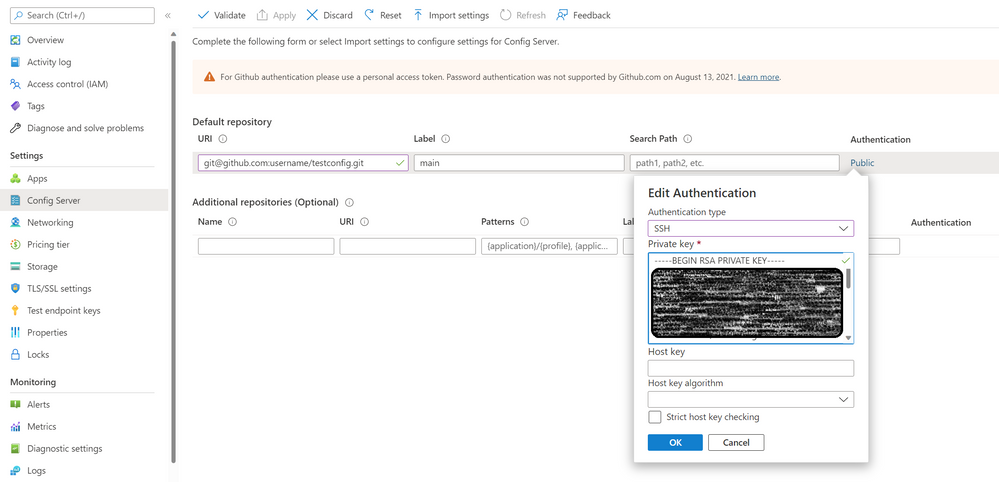
Go to the Azure Spring Apps Service -> Config Server
Specify the GitHub URL, Label etc. and choose SSH as the Authentication protocol. Copy your private key in the text box and save.
(Optional) To ensure that the key works, you can test it on the local system as well.
Refer: Clone GitHub Repository using SSH
eval "$(ssh-agent -s)"

ssh-add <private key>

git clone <GIT_URL>
#Example of the URL: git@github.com:username/testconfig.git
You should now have access to your private GitHub Repository via SSH from Azure Spring Apps.