This post has been republished via RSS; it originally appeared at: Outlook Blog articles.
Introducing the new calendar event card. With just one click, view event details and take quick action when needed. Now you can quickly respond to an invitation, join a meeting or even get more information about the organizer though the new event card.
Previously, you needed to double click on an event to respond to an invitation or join an online meeting then use the command ribbon to take action. The process and streamlined design is now simplified and saves time.
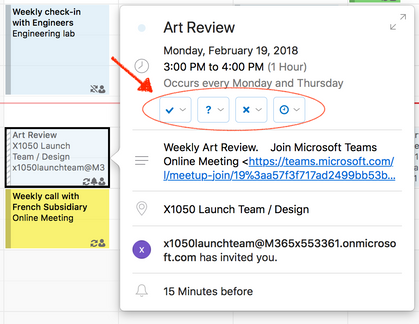
Just click a calendar event to access the details and instantly respond if necessary
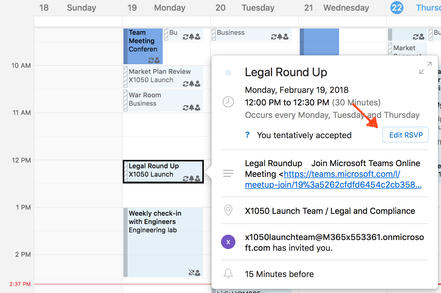
Edit your response anytime
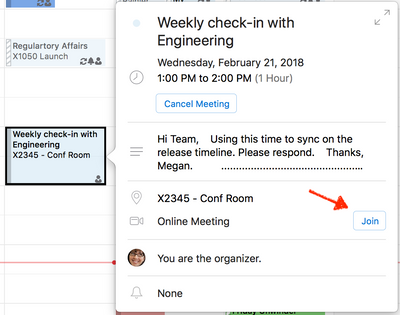
Join an online meeting with a single click
…And as a bonus - you can check the organizer's contact card directly from the Event Card.
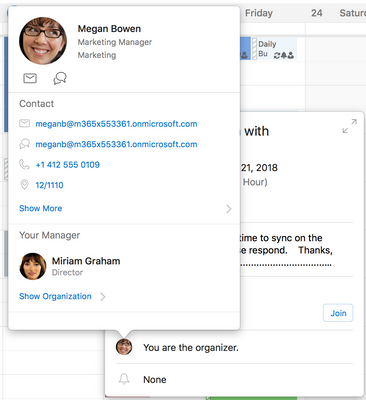
Click the contact photo to view new contact card
The new calendar event card is available in Insider Fast starting in version 16.11 (180220) and requires activation via Office 365 subscription.
We would love to hear from you as we make improvements in Insider Fast, so please provide feedback and report issues via Help > Contact Support. If you would like to see other enhancements in Outlook for Mac, please vote for your feature request via Help > Suggest a Feature.