
This post has been republished via RSS; it originally appeared at: New blog articles in Microsoft Tech Community.
Now generally available in select regions, your new and existing Azure SQL Databases and elastic pools that use the general purpose tier can enable the zone redundant configuration. This configuration is offered for both serverless and provisioned compute.
The zone redundant configuration utilizes Azure Availability Zones to replicate databases across multiple physical locations within an Azure region. By selecting zone redundancy, you can make your serverless and provisioned general purpose single databases and elastic pools resilient to a much larger set of failures, including catastrophic datacenter outages, without any changes of the application logic. This configuration offers 99.995% availability SLA and RPO=0. For more information see general purpose service tier zone redundant availability.
How to enable the zone redundant configuration
The zone redundant configuration can be enabled for both new and existing serverless and provisioned general purpose databases and elastic pools. Once the zone redundant option is enabled, Azure SQL Database will automatically reconfigure the database or pool. You can configure this setting by using Portal, CLI, PowerShell, or ARM API.
Portal
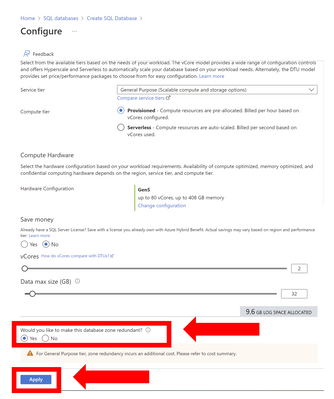
The following diagrams illustrate how to use Azure portal to configure a new general purpose provisioned database to be zone redundant.
Step 1: Select Configure database in the Create SQL Database blade.

Step 2: In the Configure blade select Yes to make the database zone redundant then click Apply.
CLI
The following CLI commands can be used to enable the zone redundant configuration using the –zone-redundant {false, true} parameter.
Below is an example CLI command for creating a new zone redundant provisioned general purpose tier Azure SQL database.
PowerShell
The following PowerShell commands can be used to enable the zone redundant configuration using the -ZoneRedundant parameter.
Below is an example CLI command for creating a new zone redundant provisioned general purpose tier Azure SQL database.
ARM
The zone redundant configuration can be enabled using create or update in ARM.
Regions where this is available
Zone redundant Azure SQL database general purpose tier is generally available in the following regions:
- West Europe
- North Europe
- West US 2
- France Central
Zone redundant Azure SQL database general purpose tier is available in preview in the following regions:
- East US
- East US 2
- Southeast Asia
- Australia East
- Japan East
- UK South
Additional regions will be added over time. Visit the documentation for up-to-date information on regions that support Availability Zones in Azure.
Please visit the pricing pages for single databases and elastic pools for pricing details for this configuration.