
This post has been republished via RSS; it originally appeared at: Microsoft Tech Community - Latest Blogs - .
Welcome Message from Lee
A Doze of Motivation
Data is the new oil and I live in an oil country where nobody is drilling --- Olanrewaju Oyinbooke (2019). I am so happy right now that I can share a quote that inspires me so much at the early stage of my career. Interestingly, this quote is also by myself.
You will agree with me that in Nigeria and Africa, we haven’t gotten the best value from the data around us yet and that is exactly what this track is trying to solve. By equipping you to be able to fill this gap. Did I just say Gap? Yes, there is a Data Gap.
What is Data Gap?
Data Gap is a way to represent the rate of data generation versus analysis. Daily, Data are being generated at an exponential rate but only few are being analyzed. What could cause this gap? a very obvious reason is unavailability of technical-know-how. we have fewer skilled data analyst compare to the available data.
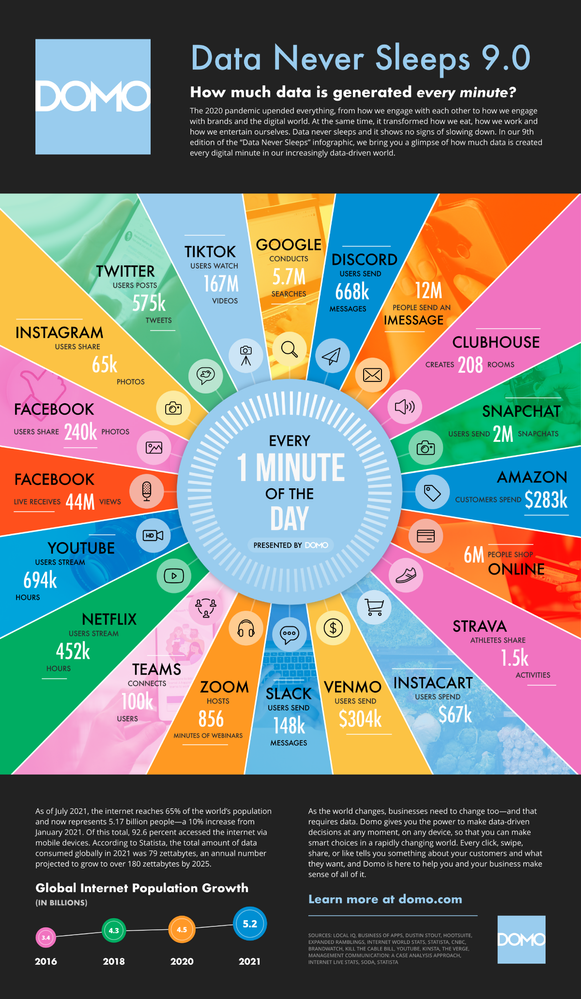
To better understand the volume of data generated daily, let us check this data never sleeps chart by domo.
This huge data gap means opportunity. as predicted by Microsoft, between 2020-2025, there will be 43million job roles in the data analysis and related role space. This will however favour only the skillful and not beginners.
This post is the primary guideline for the Data Analysis Track and will help you to navigate the entire learning journey.
In case you missed the onboarding session, kindly click here https://aka.ms/30DLOnboardingRecap to catch up with everything we did.
On the table below, you will find all the topics and link to the sessions
| Day of the Week | Date | Learning Contents | Objectives | Session Type | Recap Link |
| Monday | 6/13/2022 | •The World of Analytics – BI and Data Analysis •Start with Value and not the Tool •Few Steps to Take for all Your Data Analysis Projects •Microsoft Excel Repeating the Miracle •Excel VLOOKUP •Excel Pivot tables, Charts, Building reports |
Exploring the world of Analytics Understanding Business Value Intro to MS Excel and Excel Look Up |
Video Content on YouTube Link to Microsoft Excel Tips Link to Download COVID-19 Dataset through MS Excel |
|
| Tuesday | 6/14/2022 | 40 Free Dataset for your personal projects COVID19 Dataset in Excel - Web scraping examples |
Get access to different sites/platform for open source dataset Learn how to scrape COVID19 Dataset from GitHub using MS Excel |
Recorded video content | |
| Wednesday | 6/15/2022 | Build COVID-19 Dashboard with Microsoft Excel | Build Microsoft Excel Dashboard for COVID19 Cases in Nigeria | Reactor Session | |
| Thursday | 6/16/2022 | Build Stunning Dashboard with Power BI from the Click of a Button | Participants should be able to create a Power BI Dashboard directly from SharePoint List and within MS Teams at the click of a button. Participants should be able to embed MS Power BI Dashboard into MS PowerPoint |
Recorded Session | |
| Friday | 6/17/2022 | A Day in the Life of a Data Analyst | This session will present participants with the opportunity to learn from Industry experts what it means to work as a data analyst in the corporate settings | Reactor Session | |
| Saturday | 6/18/2022 | General Track - Recap for the Week | An hour session to run through all the learning for the week and also answer questions | Teams Live Webinar Event | |
| Sunday | 6/19/2022 | Feedback | Discord Engagement | ||
| Monday | 6/20/2022 | Introduction to Power BI Desktop | •Overview of Power BI Functionalities and installing Power BI Desktop •Connecting to different Data Sources in Power BI - Excel data, SharePoint List, Folder, Web, and Database Build a dashboard by dragging and dropping in Power BI Desktop |
Reactor Session | |
| Tuesday | 6/21/2022 | Power Query in Power BI, Getting Familiar and working with Power Query | •Import VS Direct Query in Power BI •Power Query Intro and PQ Editor Functionalities •Importing folders into Power B •Importing data into Query Editor •Formatting data in Query editor •Combining tables in Query editor |
Recorded Session | |
| Wednesday | 6/22/2022 | Data Modelling and Welcome to the World of Data Analysis Expression (DAX) | •Data Modelling – What is it? •Types of Relationships •Managing relationships. •Relationship cardinality •Introduction to DAX •Creating Calculated Columns and Measures Build Your 2nd Dashboard with Modelled Data and Calculated Column and Measures |
Reactor Session | |
| Thursday | 6/23/2022 | DAX Application | Apply the DAX Concepts on a Dashboard Project | Live Event | |
| Friday | 6/24/2022 | Page Navigation, Bookmarking and Tooltips in Power BI Desktop | Adding Page Navigation to Power BI Report Bookmarking Power BI Report Adding Buttons to Power BI Report ToolTip in Power BI Report |
Reactor Session | |
| Saturday | 6/25/2022 | General Track - Cloud Skill Challenge Journey | Participants are to share their progress on the Cloud Skill Challenge, ask questions and also get motivated to commit to completing the Cloud Skill Challenge | Live Event | |
| Sunday | 6/26/2022 | Feedback | |||
| Monday | 6/27/2022 | •Color Psychology and Themes in Power BI •Font type and Styles •Data Storytelling in Power BI Desktop |
Understand Colors and theme Building a Storytelling dashboard in Power BI Desktop |
Reactor Session | |
| Tuesday | 6/28/2022 | Intro to Power BI Service | Introduction to Power BI Service Publishing to the web |
MS Learn - Cloud Skill Challenge Module | |
| Wednesday | 6/29/2022 | Dashboard Overview | Introduction to Power BI Dashboard Creating and Managing Interactive Dashboards |
||
| Thursday | 6/30/2022 | Data Refresh Schedule in Power BI Service | Participants should learn how to Schedule Refresh in Power BI Desktop | Reactor Session | |
| Friday | 7/1/2022 | Row Level Access Security in Power BI | How do you control access and govern your reports and dashboard | Reactor Session | |
| Saturday | 7/2/2022 | General Track - Optimize Your LinkedIn Profile | Participants should learn how to create and Optimize LinkedIn Profile | Reactor Session | |
| Sunday | 7/3/2022 | Feedback | Discord Conversation | ||
| Monday | 7/4/2022 | Your Project. It's Your Time to Showcase Your Skill. | Participants are expected to work on a project that will help them demonstrate all the things they've learnt in the course of the program with proper documentation on GitHub | Individual led with mentor support | |
| Tuesday | 7/5/2022 | Keep working on your project | |||
| Wednesday | 7/6/2022 | Keep working on your project | |||
| Thursday | 7/7/2022 | Keep working on your project | |||
| Friday | 7/8/2022 | Keep working on your project | |||
| Saturday | 7/9/2022 | General Track - Moving on from Here | Participants should be proud of their learning and share testimonies of their growth. Participants should also be linked to their campus communities for continued learning |
Teams Webinar Event | |
| Sunday | 7/10/2022 | Catch Up and Share Your Learning | |||
| Monday | 7/11/2022 | Tidy Up your GitHub and LinkedIn Profile | Participants should be able to have updated LinkedIn Profile and Github Profile with their projects well documented | Individual led with mentor support | |
| Tuesday | 7/12/2022 | Graduation | Graduation | Live Event |
Additional Resources
- Microsoft Learn for Students: https://aka.ms/learnstudent