
This post has been republished via RSS; it originally appeared at: New blog articles in Microsoft Tech Community.
A new role specifically for Yammer administrators is now generally available in Azure Active Directory (AAD). This role allows an AAD administrator to designate who can manage the Yammer service, from directly within AAD. A user with this Yammer admin role can manage all aspects of the Yammer service, along with modifying Yammer communities without becoming an owner or member of that community.
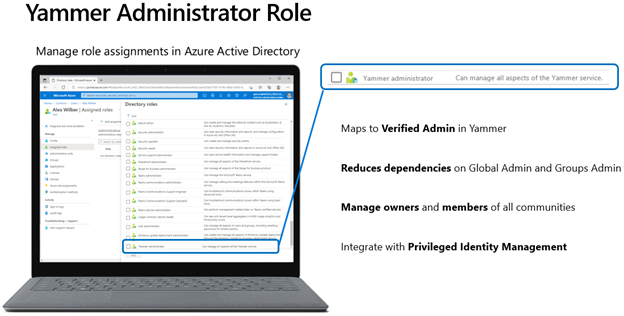
The Yammer administrator role will be available for customers who are in either Native Mode, Non-Native Mode, or have multiple networks in a mixed configuration. This new built-in role reduces dependencies on the Global administrator and Groups administrator roles to manage assets related to Yammer communities.
How does the Yammer administrator role work?
An admin who manages AAD roles will assign the Yammer admin role from within AAD. Typically, this action is performed through the AAD user experience and is performed by a Global administrator or a Privileged role administrator.

Once the Yammer admin role is assigned to a user in AAD, the assignment will be synchronized to the Yammer service. That user will appear in Yammer as a Verified Admin. From that point forward, the user can perform all actions available to a Verified Admin.
Examples of some of the tasks that the Yammer Administrator role can complete in AAD:
- Change a community from public to private, or private to public
- Delete a community
- Modify owners and members of a community without being an admin of the group/community
If the role is removed from the user in AAD, the service will synchronize that change to Yammer and the user will no longer have Verified Admin privileges.
Responsibilities of a Verified Admin within Yammer
As a verified admin, a user can configure security settings, monitor keywords for appropriate use, manage data retention, and export data. A verified admin can also perform integration with other tools. Additionally, a verified admin can perform the actions of a network admin, such as configure network settings, logos and colors, usage policies, and manage internal users and guests. These capabilities are provided to the Yammer administrator role in AAD since the Yammer administrator role maps to Verified Admin. For more details of each admin role, review this support article for a breakdown and their tasks.
Best Practices for the number of Yammer Admins in your network
Typically, we see that our customers have between 1-3 Yammer Admins, however this number varies based on organization’s size and number of members in the Yammer network. Having a core team from HR (Human Resources), IT (information technology), Communications, and Legal is a good place to start, and we recommend setting up a process for governance for addressing concerns and issues. With this new role in AAD, you might consider who else needs to have administration capabilities at your organization who did not have it prior. Learn more about best practices for Yammer governance here.
FAQ
Is this available in Native Mode and Non-Native Mode networks?
Yes. Users can be assigned the Yammer Admin role in AAD regardless of Native Mode status.
Will existing Verified Admins in Yammer automatically be assigned the new AAD role?
No. Any Verified Admins created directly in Yammer need to separately be assigned the role of Yammer administrator in Azure Active Directory.
Can a user with the Yammer Administrator role perform Native Mode migration?
No. Due to the scope of changes involved in a Native Mode migration, only users assigned the role of Global administrator can conduct a migration to Native Mode.
Can this role co-exist with Verified Admins and Network Admins assigned directly in Yammer?
Yes. Users can be assigned the Yammer administrator role in AAD while other users are assigned Verified Admin or Network Admin within Yammer.
Can the Yammer administrator role modify membership directly in Yammer?
Since the Yammer Administrator role maps to Verified Admin, users will only be able to modify membership of public communities from directly within Yammer. However, the Yammer administrator role can manage owners and members of all Yammer communities from within AAD.
Additional resources and FAQs can be found:
- Manage Yammer admins - Yammer | Microsoft Docs
- Yammer administration documentation - Yammer | Microsoft Docs
- Overview of Native Mode for Microsoft 365 - Yammer | Microsoft Docs
The Yammer administrator role in AAD allows administrators to assign roles and permissions using similar processes developed for other built-in roles, such as the SharePoint administrator and Teams administrator roles. Use the new Yammer administrator role to manage Yammer today!